%20--%3e%3cdefs%3e%3cstyle%3e%20.st0%20{%20fill:%20%23061b40;%20}%20.st1%20{%20fill:%20%23306af1;%20}%20.st2%20{%20fill:%20%235ce5cf;%20}%20%3c/style%3e%3c/defs%3e%3cg%3e%3cpath%20class='st0'%20d='M55,10.5h9v3h-9v9h12V7.5h-12v3ZM64,19.5h-6v-3h6v3Z'/%3e%3cpolygon%20class='st0'%20points='69%2016.5%2078%2016.5%2078%2019.5%2069%2019.5%2069%2022.5%2081%2022.5%2081%2013.5%2072%2013.5%2072%2010.5%2081%2010.5%2081%207.5%2069%207.5%2069%2016.5'/%3e%3cpolygon%20class='st0'%20points='95%2010.5%2095%207.5%2083%207.5%2083%2022.5%2095%2022.5%2095%2019.5%2086%2019.5%2086%2016.5%2095%2016.5%2095%2013.5%2086%2013.5%2086%2010.5%2095%2010.5'/%3e%3cpath%20class='st0'%20d='M40,1.5v21h11.6l1.4-1.4v-7.6h0c0,0-1.4-1.5-1.4-1.5l1.4-1.4V2.9l-1.4-1.4h-11.6ZM50,19.5h-7v-6h7v6ZM50,10.5h-7v-6h7v6Z'/%3e%3c/g%3e%3cpath%20class='st1'%20d='M23.1,24L14.7,4.8l-4.9,11.2h3.8l-1.8,4H3.3L12.1,0H2C.9,0,0,.9,0,2v20c0,1.1.9,2,2,2h21.1Z'/%3e%3cpath%20class='st2'%20d='M34,0h-16.8l10.6,24h6.2c1.1,0,2-.9,2-2V2C36,.9,35.1,0,34,0ZM32.5,20h-4V4h4v16Z'/%3e%3c/svg%3e)
 Join Now
Windowssandboxmcp
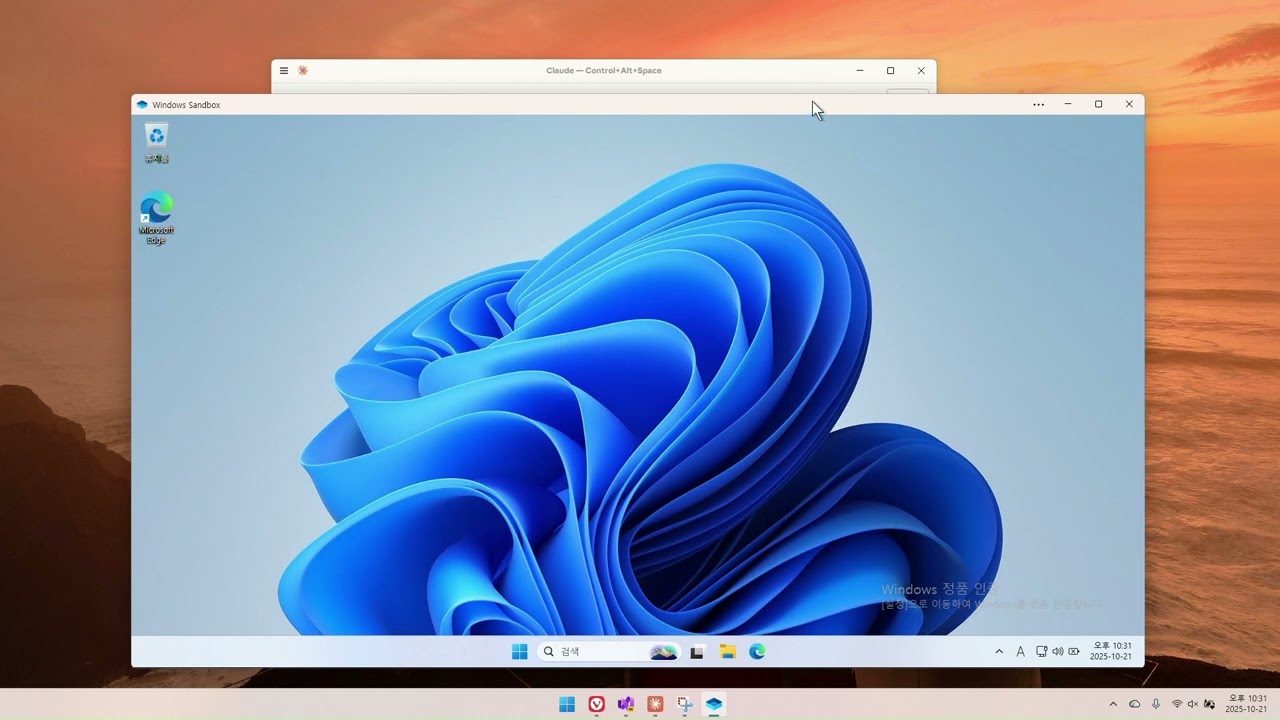
A.NET tool for managing Windows Sandbox instances via the MCP protocol, supporting functions such as sandbox lifecycle management, command execution, folder sharing, and network monitoring.
rating : 2 points
downloads : 11.5K
What is Windows Sandbox MCP?
Windows Sandbox MCP is an innovative tool that connects the Windows Sandbox environment with an AI assistant (such as Claude) via the Model Context Protocol (MCP). This means you can start, configure, and control the Windows Sandbox environment using natural language instructions, just like having a conversation with a real person, without the need to manually operate complex command lines or configuration interfaces.How to use Windows Sandbox MCP?
Using this tool is very simple: First, configure the MCP server in Claude Desktop or VS Code, and then restart the application. After that, you can directly issue natural language instructions to the AI assistant to manage the Windows Sandbox, such as 'Start a new Windows Sandbox' or 'Execute notepad in the sandbox'.Use cases
This tool is particularly suitable for the following scenarios: 1. Security testing: Test suspicious software in an isolated environment. 2. Development and debugging: Create a clean development environment for testing. 3. Education and training: Safely demonstrate software operations. 4. Automation tasks: Automate the sandbox operation process through an AI assistant.Main features
Sandbox lifecycle management
Start and stop Windows Sandbox instances with simple instructions, supporting custom configuration options.
Command execution
Execute commands and scripts in the sandbox environment, just like operating in a local terminal.
Shared folders
Map host directories to the sandbox for convenient file sharing and transfer.
Network management
Get the network configuration and IP address information of the sandbox and monitor the network status.
Session management
Connect to and monitor sandbox sessions and manage remote session windows.
Status monitoring
Check in real - time whether the sandbox is running and get running status information.
Advantages
Natural language interaction: Control the sandbox through conversations without memorizing complex commands.
Highly integrated: Seamlessly integrate with tools such as Claude Desktop and VS Code.
Secure isolation: Perform operations in a completely isolated environment to protect the host's security.
Easy to use: Simple configuration, and you can start using it within a few minutes.
Automation ability: Automate repetitive sandbox operations through an AI assistant.
Limitations
High system requirements: Only supports Windows 11 24H2 or later versions.
Experimental project: Currently in the experimental stage, and there may be stability issues.
Single - instance limitation: Only one sandbox instance can be run at a time.
Dependent on external tools: Requires Claude Desktop or VS Code as a client.
How to use
Check system requirements
Ensure that your system is Windows 11 24H2 or a later version and that the Windows Sandbox feature is enabled.
%20--%3e%3cdefs%3e%3cstyle%3e%20.st0%20{%20fill:%20%230080ff;%20}%20%3c/style%3e%3c/defs%3e%3cpath%20class='st0'%20d='M16.2,11.1c.4.5.4,1.2,0,1.8l-4.7,7.1h-3.8l5.3-8L7.6,4h3.8l4.7,7.1Z'/%3e%3c/svg%3e)
Install the.NET SDK
Install the.NET 10.0 SDK, which is the necessary environment for running the MCP server.
Configure Claude Desktop
Edit the Claude Desktop configuration file and add the Windows Sandbox MCP server configuration.
Restart the application
Completely close and restart Claude Desktop to make the configuration take effect.
Start using
In Claude Desktop, you can now control the Windows Sandbox through natural language instructions.
Usage examples
Securely test unknown software
When you receive a suspicious software file, you can safely test it in the sandbox without affecting your main system.
Test the development environment
Developers can test applications in a clean sandbox environment to ensure that there are no residual configurations affecting the test results.
Demonstrate software operations
Teachers or trainers can demonstrate software operations in the sandbox and completely clean up the environment after the demonstration.
Automate configuration tasks
Automate repetitive sandbox configuration tasks through an AI assistant to save time and effort.
Frequently Asked Questions
Does this tool support Windows 10?
Can I use this tool in a production environment?
Can multiple sandboxes be run simultaneously?
How can I report problems or provide feedback?
In addition to Claude Desktop, does it support other clients?
Will the data in the sandbox be persistently saved?
Related resources
GitHub repository
Project source code and latest updates
Demonstration video
Tool function demonstration video
NuGet package
Project NuGet package release page
Windows Sandbox documentation
Microsoft official Windows Sandbox documentation
.NET download
.NET SDK download page




Markdownify MCP
Markdownify is a multi-functional file conversion service that supports converting multiple formats such as PDFs, images, audio, and web page content into Markdown format.
TypeScript
48.0K
5 points

Notion Api MCP
Certified
A Python-based MCP Server that provides advanced to-do list management and content organization functions through the Notion API, enabling seamless integration between AI models and Notion.
Python
30.9K
4.5 points

Gitlab MCP Server
Certified
The GitLab MCP server is a project based on the Model Context Protocol that provides a comprehensive toolset for interacting with GitLab accounts, including code review, merge request management, CI/CD configuration, and other functions.
TypeScript
36.7K
4.3 points

Duckduckgo MCP Server
Certified
The DuckDuckGo Search MCP Server provides web search and content scraping services for LLMs such as Claude.
Python
102.2K
4.3 points

Unity
Certified
UnityMCP is a Unity editor plugin that implements the Model Context Protocol (MCP), providing seamless integration between Unity and AI assistants, including real - time state monitoring, remote command execution, and log functions.
C#
45.8K
5 points

Figma Context MCP
Framelink Figma MCP Server is a server that provides access to Figma design data for AI programming tools (such as Cursor). By simplifying the Figma API response, it helps AI more accurately achieve one - click conversion from design to code.
TypeScript
87.2K
4.5 points

Gmail MCP Server
A Gmail automatic authentication MCP server designed for Claude Desktop, supporting Gmail management through natural language interaction, including complete functions such as sending emails, label management, and batch operations.
TypeScript
31.8K
4.5 points

Minimax MCP Server
The MiniMax Model Context Protocol (MCP) is an official server that supports interaction with powerful text-to-speech, video/image generation APIs, and is suitable for various client tools such as Claude Desktop and Cursor.
Python
74.5K
4.8 points