%20--%3e%3cdefs%3e%3cstyle%3e%20.st0%20{%20fill:%20%23061b40;%20}%20.st1%20{%20fill:%20%23306af1;%20}%20.st2%20{%20fill:%20%235ce5cf;%20}%20%3c/style%3e%3c/defs%3e%3cg%3e%3cpath%20class='st0'%20d='M55,10.5h9v3h-9v9h12V7.5h-12v3ZM64,19.5h-6v-3h6v3Z'/%3e%3cpolygon%20class='st0'%20points='69%2016.5%2078%2016.5%2078%2019.5%2069%2019.5%2069%2022.5%2081%2022.5%2081%2013.5%2072%2013.5%2072%2010.5%2081%2010.5%2081%207.5%2069%207.5%2069%2016.5'/%3e%3cpolygon%20class='st0'%20points='95%2010.5%2095%207.5%2083%207.5%2083%2022.5%2095%2022.5%2095%2019.5%2086%2019.5%2086%2016.5%2095%2016.5%2095%2013.5%2086%2013.5%2086%2010.5%2095%2010.5'/%3e%3cpath%20class='st0'%20d='M40,1.5v21h11.6l1.4-1.4v-7.6h0c0,0-1.4-1.5-1.4-1.5l1.4-1.4V2.9l-1.4-1.4h-11.6ZM50,19.5h-7v-6h7v6ZM50,10.5h-7v-6h7v6Z'/%3e%3c/g%3e%3cpath%20class='st1'%20d='M23.1,24L14.7,4.8l-4.9,11.2h3.8l-1.8,4H3.3L12.1,0H2C.9,0,0,.9,0,2v20c0,1.1.9,2,2,2h21.1Z'/%3e%3cpath%20class='st2'%20d='M34,0h-16.8l10.6,24h6.2c1.1,0,2-.9,2-2V2C36,.9,35.1,0,34,0ZM32.5,20h-4V4h4v16Z'/%3e%3c/svg%3e)
 Join Now
Opengraph Io MCP

og-mcp is an MCP server that provides AI agents with all the functions of the OpenGraph.io API, including web page metadata extraction, content scraping, screenshot, and AI image generation, and allows secure access through the standard MCP interface without exposing API keys.
rating : 2 points
downloads : 8.9K
What is the OpenGraph MCP Server?
The OpenGraph MCP Server is a bridge connecting AI assistants and OpenGraph.io services. It allows AI to browse web pages, extract information, and generate images like humans without directly accessing API keys. You can think of it as equipping AI with the capabilities of a 'web browser' and an 'image generator'.How to use the OpenGraph MCP Server?
It's very simple to use: 1) Get an App ID from OpenGraph.io; 2) Select your AI tool (Claude, Cursor, etc.); 3) Set it up according to the configuration guide; 4) Start letting AI use web analysis and image generation functions.Applicable scenarios
Suitable for scenarios where AI is needed to process web page content, generate report illustrations, create technical charts, produce social media materials, analyze competitor websites, extract article summaries, etc. It is especially suitable for content creators, developers, marketers, and researchers.Main Features
Web Page Data Analysis
Extract OpenGraph data (title, description, image, etc.) from web pages and obtain structured information
Content Scraping
Scrape the full content of web pages, including article text, image links, etc.
Web Page Screenshot
Generate real-time screenshots of web pages, supporting different devices and resolutions
AI Image Generation
Create various types of professional images: illustrations, charts, icons, social media cards, QR codes, etc.
Diagram Generation
Automatically generate technical diagrams from syntax such as Mermaid, D2, Vega, etc.
Image Iterative Optimization
Modify, optimize, and create variants based on existing images
Multi-Client Support
Supports various AI tools such as Claude Desktop, Cursor, VS Code, Windsurf, JetBrains, Zed, etc.
Secure API Access
AI indirectly accesses OpenGraph.io through the MCP server without exposing API keys
Advantages
One-stop solution: Integrates multiple functions of web analysis and image generation
AI-friendly: Specifically designed for AI assistants, with simple and intuitive tool calls
Secure and reliable: API keys are not directly exposed to AI, protecting account security
Flexible configuration: Supports multiple AI clients and transmission methods
Professional image generation: Provides preset templates and styles to quickly generate high-quality images
Continuous updates: Based on OpenGraph.io services, functions are constantly enriched
Limitations
Requires an OpenGraph.io account: You must register and obtain an App ID to use
Depends on network connection: All functions require access to the OpenGraph.io API
There is a learning curve for image generation: You need to understand the uses of various parameters and presets
Some advanced functions may require payment: Depending on the OpenGraph.io package limitations
Limited local saving function: Image export to disk only supports the stdio transmission mode
How to Use
Get an OpenGraph.io App ID
Visit the OpenGraph.io official website to register an account and get your App ID. This is a prerequisite for using all functions.
%20--%3e%3cdefs%3e%3cstyle%3e%20.st0%20{%20fill:%20%230080ff;%20}%20%3c/style%3e%3c/defs%3e%3cpath%20class='st0'%20d='M16.2,11.1c.4.5.4,1.2,0,1.8l-4.7,7.1h-3.8l5.3-8L7.6,4h3.8l4.7,7.1Z'/%3e%3c/svg%3e)
Select the installation method
Select the installation method according to your AI tool. It is recommended to use the CLI installer, which will be automatically configured.
Configure the AI client
Add MCP server settings to the configuration file according to the configuration guide of the corresponding AI tool.
Restart the AI client
After saving the configuration file, restart your AI tool (such as Claude Desktop, Cursor, etc.).
Start using
In the AI conversation, you can now use OpenGraph-related tools. AI will automatically recognize available functions.
Usage Examples
Content Research Assistant
Let AI help you research a certain topic, automatically collect and analyze relevant web page content
Technical Document Illustration Generation
Automatically generate professional illustrations such as architecture diagrams and flowcharts for technical documents
Social Media Content Production
Quickly generate social media sharing cards and illustrations
Competitor Analysis
Automatically analyze the functions and content of competitor websites
QR Code Generation
Generate a QR code with a brand style for an event or product
Frequently Asked Questions
Do I need to pay to use the OpenGraph MCP Server?
Which AI clients are supported?
What is the quality of image generation?
How to protect the security of my API key?
Can it be used offline?
How to troubleshoot problems?
Can I customize the image generation style?
Does it support batch processing of web pages?
Related Resources
OpenGraph.io Official Website
Register an account, get an App ID, view API documentation, and package details
GitHub Code Repository
View source code, submit issues, and participate in contributions
MCP Protocol Documentation
Understand the technical specifications of the Model Context Protocol
Claude Desktop Configuration Guide
Official documentation for using and configuring Claude Desktop
Mermaid Syntax Guide
Learn to use Mermaid syntax to create various diagrams
Release Page
Download the latest version and the Claude Desktop extension
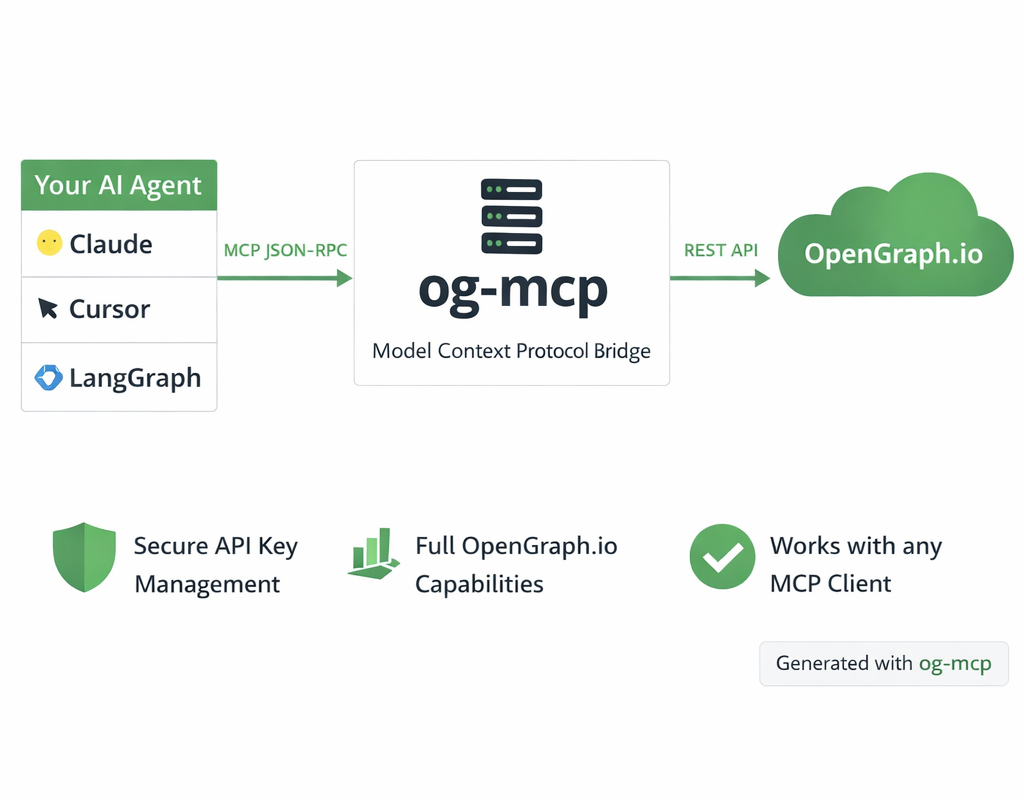 Diagram generated with og-mcp's image generation tools


Duckduckgo MCP Server
Certified
The DuckDuckGo Search MCP Server provides web search and content scraping services for LLMs such as Claude.
Python
102.1K
4.3 points

Markdownify MCP
Markdownify is a multi-functional file conversion service that supports converting multiple formats such as PDFs, images, audio, and web page content into Markdown format.
TypeScript
48.9K
5 points

Gitlab MCP Server
Certified
The GitLab MCP server is a project based on the Model Context Protocol that provides a comprehensive toolset for interacting with GitLab accounts, including code review, merge request management, CI/CD configuration, and other functions.
TypeScript
35.6K
4.3 points

Notion Api MCP
Certified
A Python-based MCP Server that provides advanced to-do list management and content organization functions through the Notion API, enabling seamless integration between AI models and Notion.
Python
31.9K
4.5 points

Figma Context MCP
Framelink Figma MCP Server is a server that provides access to Figma design data for AI programming tools (such as Cursor). By simplifying the Figma API response, it helps AI more accurately achieve one - click conversion from design to code.
TypeScript
85.7K
4.5 points

Unity
Certified
UnityMCP is a Unity editor plugin that implements the Model Context Protocol (MCP), providing seamless integration between Unity and AI assistants, including real - time state monitoring, remote command execution, and log functions.
C#
45.7K
5 points

Gmail MCP Server
A Gmail automatic authentication MCP server designed for Claude Desktop, supporting Gmail management through natural language interaction, including complete functions such as sending emails, label management, and batch operations.
TypeScript
30.7K
4.5 points

Minimax MCP Server
The MiniMax Model Context Protocol (MCP) is an official server that supports interaction with powerful text-to-speech, video/image generation APIs, and is suitable for various client tools such as Claude Desktop and Cursor.
Python
74.4K
4.8 points