Langchain MCP Client
L

Langchain MCP Client

The LangChain MCP client is a project that demonstrates how to use MCP server tools through the LangChain ReAct agent. It supports flexible selection of LLM models and enables dynamic interaction via the CLI.
2.5 points
9.3K

Installation

Copy the following command to your Client for configuration
Note: Your key is sensitive information, do not share it with anyone.

๐Ÿš€ ๐Ÿฆœ ๐Ÿ”— LangChain MCP Client

This simple Model Context Protocol (MCP) client demonstrates the use of LangChain ReAct agents with MCP server tools.


Datalayer Become a Sponsor Github Actions Status PyPI - Version

๐Ÿš€ Quick Start

The LangChain MCP Client is designed to seamlessly integrate with MCP servers and leverage LangChain ReAct agents. It offers several key features:

  • ๐ŸŒ Smoothly connect to any MCP server.
  • ๐Ÿค– Flexibly select any LangChain-compatible LLM for model usage.
  • ๐Ÿ’ฌ Interact via CLI, supporting dynamic conversations.

โœจ Features

Convert to LangChain Tools

It utilizes a utility function convert_mcp_to_langchain_tools(). This function handles the simultaneous initialization of multiple specified MCP servers and converts their available tools into a list of LangChain-compatible tools (List[BaseTool]).

๐Ÿ“ฆ Installation

The Python version should be 3.11 or higher.

pip install langchain_mcp_client

๐Ÿ“š Documentation

Configuration

Create a .env file containing all the necessary API_KEYS to access your LLM. Configure the LangChain LLM, MCP servers, and example prompts in the llm_mcp_config.json5 file:

  1. LLM Configuration: Set the LangChain LLM parameters.
  2. MCP Servers: Specify the MCP servers to connect to.
  3. Example Queries: Define example queries for invoking MCP server tools. After pressing Enter, these example queries will be used for prompting.

๐Ÿ’ป Usage Examples

Basic Usage

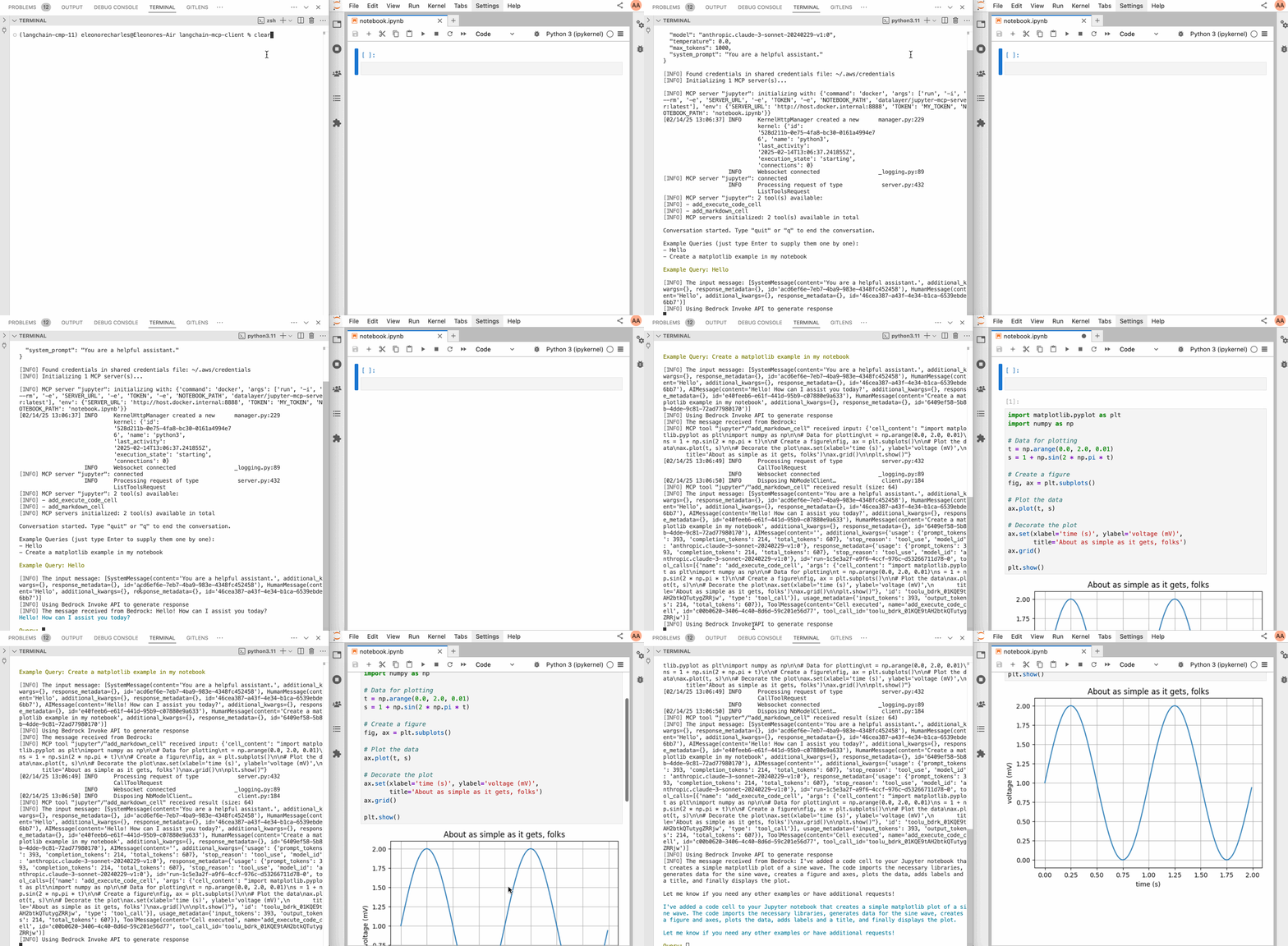
Here is an example with the Jupyter MCP Server: Check the llm_mcp_config.json5 configuration (the command depends on whether you are running on Linux, macOS, or Windows).

# Start jupyterlab.
make jupyterlab
# Launch the CLI.
make cli

Here is an example prompt.

Create many variants of a matplotlib example
๐Ÿ“„ License

The initial code for this project is from hideya/mcp-client-langchain-py (MIT License) and from langchain_mcp_tools (MIT License).

Alternatives

R
Rsdoctor
Rsdoctor is a build analysis tool specifically designed for the Rspack ecosystem, fully compatible with webpack. It provides visual build analysis, multi - dimensional performance diagnosis, and intelligent optimization suggestions to help developers improve build efficiency and engineering quality.
TypeScript
8.6K
5 points
N
Next Devtools MCP
The Next.js development tools MCP server provides Next.js development tools and utilities for AI programming assistants such as Claude and Cursor, including runtime diagnostics, development automation, and document access functions.
TypeScript
10.4K
5 points
T
Testkube
Testkube is a test orchestration and execution framework for cloud-native applications, providing a unified platform to define, run, and analyze tests. It supports existing testing tools and Kubernetes infrastructure.
Go
5.7K
5 points
M
MCP Windbg
An MCP server that integrates AI models with WinDbg/CDB for analyzing Windows crash dump files and remote debugging, supporting natural language interaction to execute debugging commands.
Python
9.6K
5 points
R
Runno
Runno is a collection of JavaScript toolkits for securely running code in multiple programming languages in environments such as browsers and Node.js. It achieves sandboxed execution through WebAssembly and WASI, supports languages such as Python, Ruby, JavaScript, SQLite, C/C++, and provides integration methods such as web components and MCP servers.
TypeScript
9.7K
5 points
P
Praisonai
PraisonAI is a production-ready multi-AI agent framework with self-reflection capabilities, designed to create AI agents to automate the solution of various problems from simple tasks to complex challenges. It simplifies the construction and management of multi-agent LLM systems by integrating PraisonAI agents, AG2, and CrewAI into a low-code solution, emphasizing simplicity, customization, and effective human-machine collaboration.
Python
9.1K
5 points
N
Netdata
Netdata is an open-source real-time infrastructure monitoring platform that provides second-level metric collection, visualization, machine learning-driven anomaly detection, and automated alerts. It can achieve full-stack monitoring without complex configuration.
Go
10.3K
5 points
M
MCP Server
The Mapbox MCP Server is a model context protocol server implemented in Node.js, providing AI applications with access to Mapbox geospatial APIs, including functions such as geocoding, point - of - interest search, route planning, isochrone analysis, and static map generation.
TypeScript
8.2K
4 points
G
Gitlab MCP Server
Certified
The GitLab MCP server is a project based on the Model Context Protocol that provides a comprehensive toolset for interacting with GitLab accounts, including code review, merge request management, CI/CD configuration, and other functions.
TypeScript
22.4K
4.3 points
M
Markdownify MCP
Markdownify is a multi-functional file conversion service that supports converting multiple formats such as PDFs, images, audio, and web page content into Markdown format.
TypeScript
32.8K
5 points
N
Notion Api MCP
Certified
A Python-based MCP Server that provides advanced to-do list management and content organization functions through the Notion API, enabling seamless integration between AI models and Notion.
Python
19.4K
4.5 points
D
Duckduckgo MCP Server
Certified
The DuckDuckGo Search MCP Server provides web search and content scraping services for LLMs such as Claude.
Python
66.8K
4.3 points
U
Unity
Certified
UnityMCP is a Unity editor plugin that implements the Model Context Protocol (MCP), providing seamless integration between Unity and AI assistants, including real - time state monitoring, remote command execution, and log functions.
C#
30.2K
5 points
F
Figma Context MCP
Framelink Figma MCP Server is a server that provides access to Figma design data for AI programming tools (such as Cursor). By simplifying the Figma API response, it helps AI more accurately achieve one - click conversion from design to code.
TypeScript
60.1K
4.5 points
M
Minimax MCP Server
The MiniMax Model Context Protocol (MCP) is an official server that supports interaction with powerful text-to-speech, video/image generation APIs, and is suitable for various client tools such as Claude Desktop and Cursor.
Python
45.4K
4.8 points
G
Gmail MCP Server
A Gmail automatic authentication MCP server designed for Claude Desktop, supporting Gmail management through natural language interaction, including complete functions such as sending emails, label management, and batch operations.
TypeScript
20.1K
4.5 points