%20--%3e%3cdefs%3e%3cstyle%3e%20.st0%20{%20fill:%20%23061b40;%20}%20.st1%20{%20fill:%20%23306af1;%20}%20.st2%20{%20fill:%20%235ce5cf;%20}%20%3c/style%3e%3c/defs%3e%3cg%3e%3cpath%20class='st0'%20d='M55,10.5h9v3h-9v9h12V7.5h-12v3ZM64,19.5h-6v-3h6v3Z'/%3e%3cpolygon%20class='st0'%20points='69%2016.5%2078%2016.5%2078%2019.5%2069%2019.5%2069%2022.5%2081%2022.5%2081%2013.5%2072%2013.5%2072%2010.5%2081%2010.5%2081%207.5%2069%207.5%2069%2016.5'/%3e%3cpolygon%20class='st0'%20points='95%2010.5%2095%207.5%2083%207.5%2083%2022.5%2095%2022.5%2095%2019.5%2086%2019.5%2086%2016.5%2095%2016.5%2095%2013.5%2086%2013.5%2086%2010.5%2095%2010.5'/%3e%3cpath%20class='st0'%20d='M40,1.5v21h11.6l1.4-1.4v-7.6h0c0,0-1.4-1.5-1.4-1.5l1.4-1.4V2.9l-1.4-1.4h-11.6ZM50,19.5h-7v-6h7v6ZM50,10.5h-7v-6h7v6Z'/%3e%3c/g%3e%3cpath%20class='st1'%20d='M23.1,24L14.7,4.8l-4.9,11.2h3.8l-1.8,4H3.3L12.1,0H2C.9,0,0,.9,0,2v20c0,1.1.9,2,2,2h21.1Z'/%3e%3cpath%20class='st2'%20d='M34,0h-16.8l10.6,24h6.2c1.1,0,2-.9,2-2V2C36,.9,35.1,0,34,0ZM32.5,20h-4V4h4v16Z'/%3e%3c/svg%3e)
 Join Now
Imgmcp
ImgMCP is a multimedia AI model aggregation platform. Through a unified MCP protocol and API, it provides users with the ability to conveniently access and use a variety of AI models (such as image generation, understanding, and processing), aiming to connect AI capabilities with user creativity and improve the creative experience and efficiency.
rating : 2.5 points
downloads : 10.4K
What is ImgMCP?
ImgMCP is a bridge connecting you with a variety of powerful AI models. It brings together excellent models in fields such as image generation, image understanding, and image processing, and encapsulates them behind a simple and easy-to-use interface. You don't need to worry about the complex technical details and invocation methods of each model. Just through ImgMCP's unified interface, you can easily unleash their creativity.How to use ImgMCP?
Using ImgMCP is very simple. First, you need an ImgMCP account and an API key. Then, you can use it in two main ways: 1) Directly call its REST API to integrate it into your application; 2) Invoke it through an AI assistant tool that supports the MCP protocol (such as Cherry Studio). In the AI assistant, you can describe your needs in natural language, and the assistant will automatically select the appropriate ImgMCP model to complete the task.Applicable scenarios
ImgMCP is very suitable for content creators, designers, marketers, developers, and any individuals or teams that need to quickly generate or process images. Whether it's providing illustrations for blog posts, designing social media materials, creating concept art, making product renderings, or simply removing the background of a picture and improving the picture resolution, ImgMCP can provide suitable tools.Main features
Unified API interface
Provides a standardized API endpoint, allowing you to call different AI models behind it in the same way, greatly simplifying the integration complexity.
MCP protocol support
Supports the Model Context Protocol, allowing you to directly call model functions in a dialogue form through AI assistants such as Claude and Cursor without writing code.
Multi-model aggregation
Integrates a variety of top - notch image AI models, including GPT - Image, Midjourney, Flux, etc. You can choose the most suitable 'brush' according to your needs.
Basic image processing
In addition to generation, it also provides practical image processing tools such as image super - resolution (enlargement) and background removal to meet the needs of the entire creative process.
Style preset library
Provides a rich collection of presets for artistic styles, materials, lighting, etc., helping you quickly achieve specific visual effects and inspiring creative inspiration.
Advantages
One - stop service: No need to switch between multiple AI model platforms. One account can be used to access multiple models.
Simplified integration: The unified API and MCP protocol make technical integration extremely simple, reducing development costs.
Improved efficiency: Direct dialogue generation through AI assistants enables non - technical users to easily handle AI creation.
Flexible selection: Different models have their own strengths. You can choose the best tool according to requirements such as 'understanding ability', 'artistry', or'stability'.
Cost - effectiveness: It may be more economical than subscribing to multiple platforms separately, and resources are used on demand without waste.
Limitations
Network - dependent: All operations require a stable network connection.
Function limited by the platform: You can only use the models and functions integrated by ImgMCP and cannot directly call specific models that are not integrated.
Possible delay: Tasks need to be queued for processing, and complex generation may take some time to wait.
Need to learn prompt skills: To achieve ideal results, you still need to master certain skills in writing prompts.
How to use
Register and obtain an API key
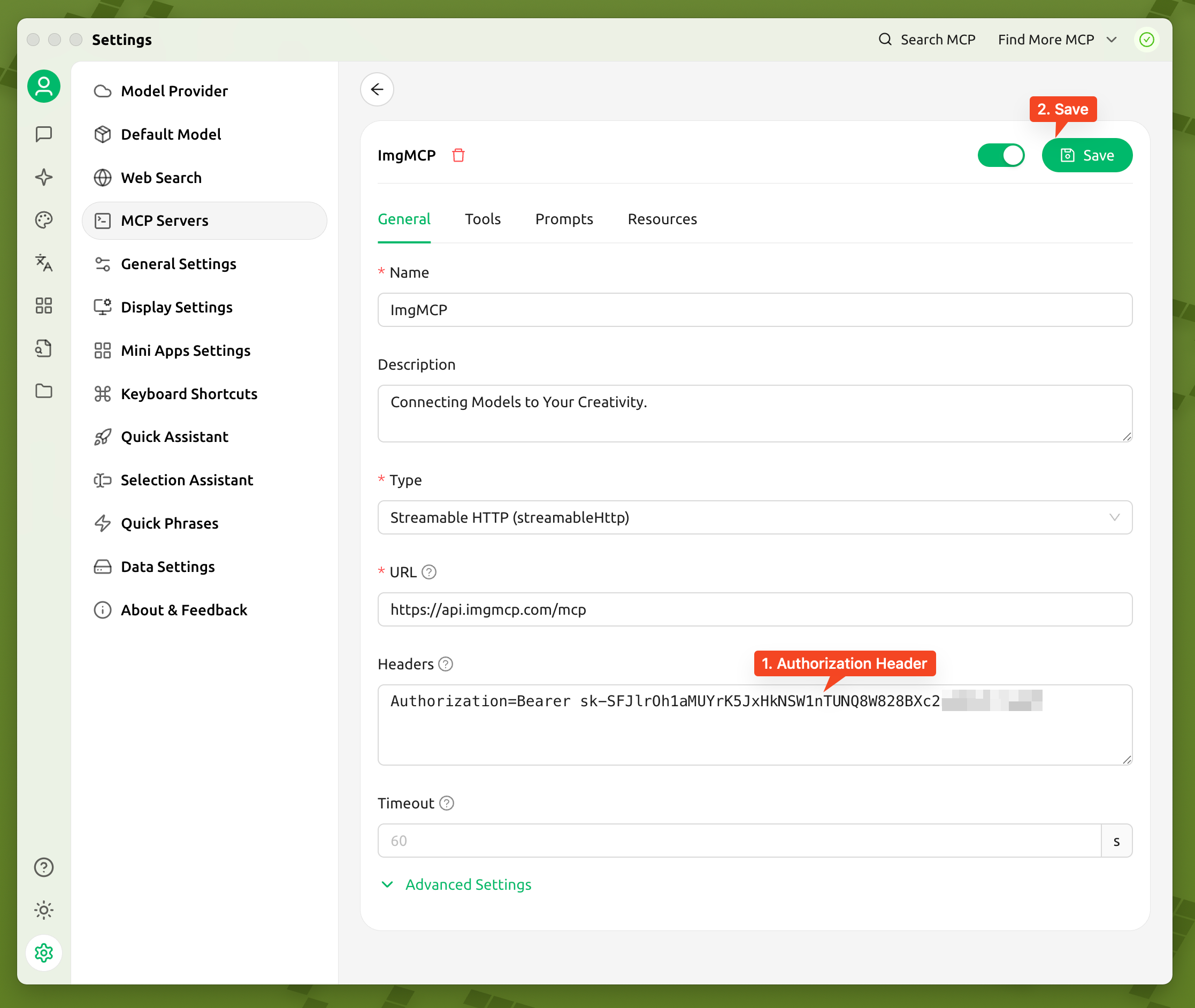
Visit the official ImgMCP website, register an account and log in. On the 'API Keys' page of the console, find your default key. Please keep this key properly.
%20--%3e%3cdefs%3e%3cstyle%3e%20.st0%20{%20fill:%20%230080ff;%20}%20%3c/style%3e%3c/defs%3e%3cpath%20class='st0'%20d='M16.2,11.1c.4.5.4,1.2,0,1.8l-4.7,7.1h-3.8l5.3-8L7.6,4h3.8l4.7,7.1Z'/%3e%3c/svg%3e)
Configure your MCP client
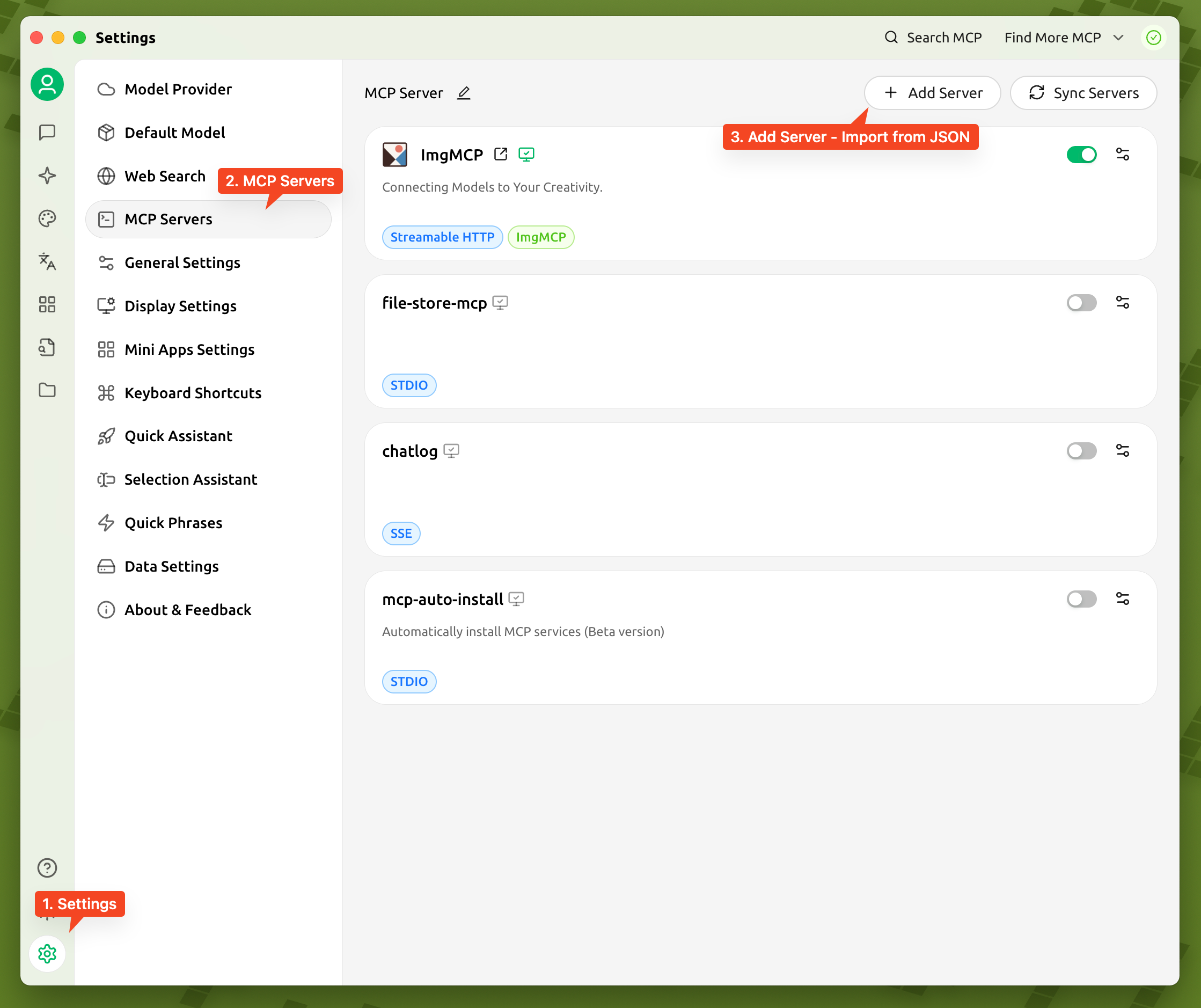
In the AI assistant tool you use (such as Cherry Studio), add ImgMCP's MCP server. You need to provide the endpoint URL and your API key.
Enable and start the dialogue
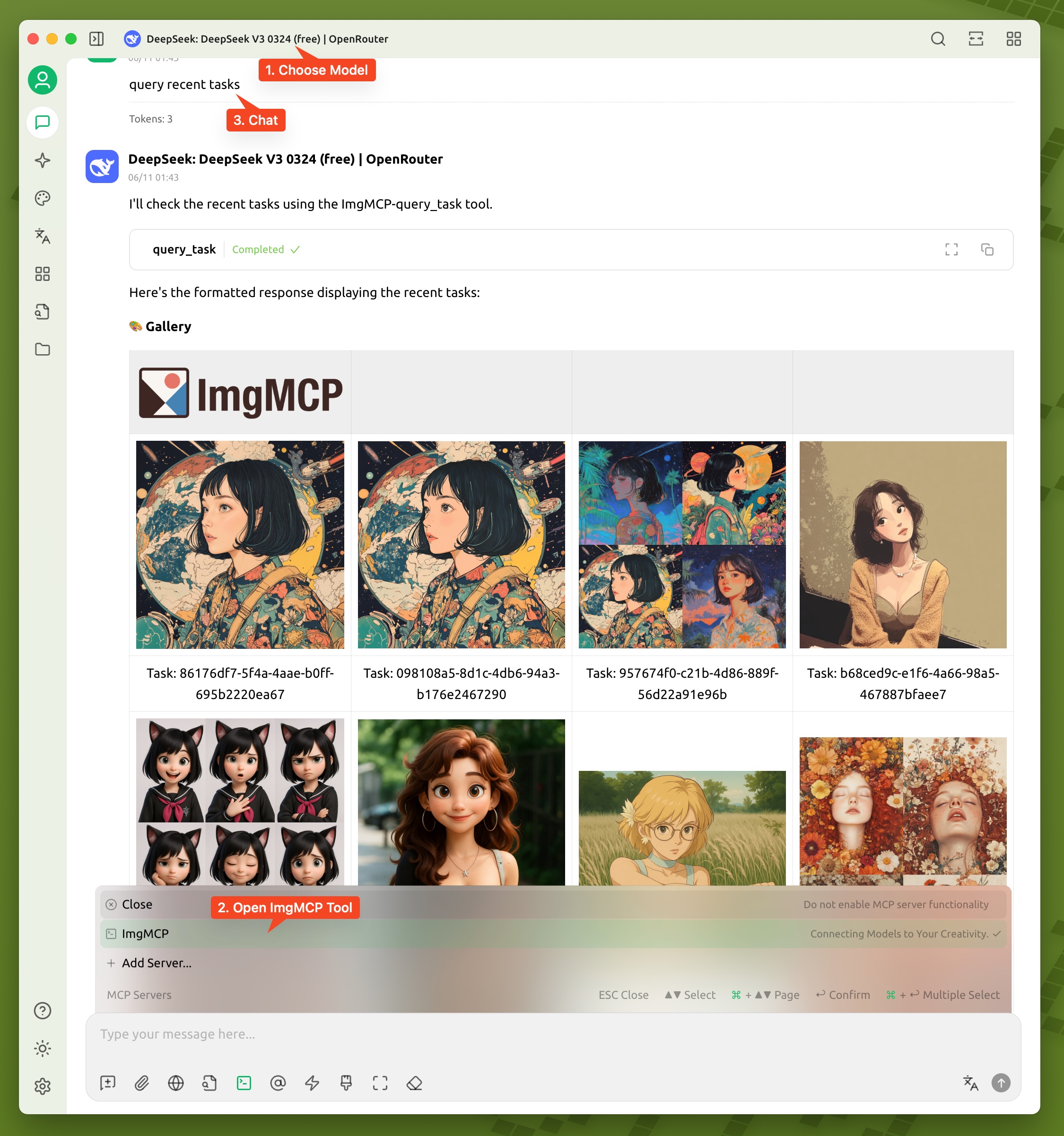
In the dialogue settings of the AI assistant, make sure the ImgMCP toolset is enabled. Then, you can directly use natural language to ask the assistant for image creation or processing needs.
Explore models and styles
You can ask the assistant 'What models are available on ImgMCP?' or 'What artistic styles do you recommend?' to understand the platform's capabilities and try different combinations.
Usage examples
Create a header image for a technology article
You're writing an article about the future of artificial intelligence and need a header image that combines a sense of technology with imagination.
Quickly create a social media poster
You need to create an Instagram poster for a coffee shop promotion this weekend and hope for a warm hand - drawn style.
Process e - commerce product images
You have a photo of a new product, but the background is cluttered. You need to cut out the image and enlarge the details for the product detail page.
Frequently Asked Questions
Do I need programming knowledge to use ImgMCP?
Is ImgMCP free?
Will my pictures be used to train other models?
Why is the generated picture different from what I expected?
What if my AI assistant tool doesn't support MCP?
Related resources
ImgMCP official website
Get the latest information, register an account, and manage your API keys.
Console (Dashboard)
After logging in, manage your account, view usage, and task history.
API key management
View and manage your API keys.
MCP official introduction
Understand the detailed technical specifications of the Model Context Protocol.
mcp - remote tool
A tool for connecting to the MCP server in clients that don't natively support MCP.


Markdownify MCP
Markdownify is a multi-functional file conversion service that supports converting multiple formats such as PDFs, images, audio, and web page content into Markdown format.
TypeScript
47.8K
5 points

Notion Api MCP
Certified
A Python-based MCP Server that provides advanced to-do list management and content organization functions through the Notion API, enabling seamless integration between AI models and Notion.
Python
32.1K
4.5 points

Gitlab MCP Server
Certified
The GitLab MCP server is a project based on the Model Context Protocol that provides a comprehensive toolset for interacting with GitLab accounts, including code review, merge request management, CI/CD configuration, and other functions.
TypeScript
36.6K
4.3 points

Duckduckgo MCP Server
Certified
The DuckDuckGo Search MCP Server provides web search and content scraping services for LLMs such as Claude.
Python
104.8K
4.3 points

Unity
Certified
UnityMCP is a Unity editor plugin that implements the Model Context Protocol (MCP), providing seamless integration between Unity and AI assistants, including real - time state monitoring, remote command execution, and log functions.
C#
46.8K
5 points

Figma Context MCP
Framelink Figma MCP Server is a server that provides access to Figma design data for AI programming tools (such as Cursor). By simplifying the Figma API response, it helps AI more accurately achieve one - click conversion from design to code.
TypeScript
87.3K
4.5 points

Context7
Context7 MCP is a service that provides real-time, version-specific documentation and code examples for AI programming assistants. It is directly integrated into prompts through the Model Context Protocol to solve the problem of LLMs using outdated information.
TypeScript
130.2K
4.7 points

Gmail MCP Server
A Gmail automatic authentication MCP server designed for Claude Desktop, supporting Gmail management through natural language interaction, including complete functions such as sending emails, label management, and batch operations.
TypeScript
31.6K
4.5 points