🚀 Autodesk Fusion MCP Server Add-in
Control Fusion with AI! This add-in connects Autodesk Fusion to the Aura Friday MCP-Link server, enabling AI agents to control Fusion as a remote tool.
Official Store Link
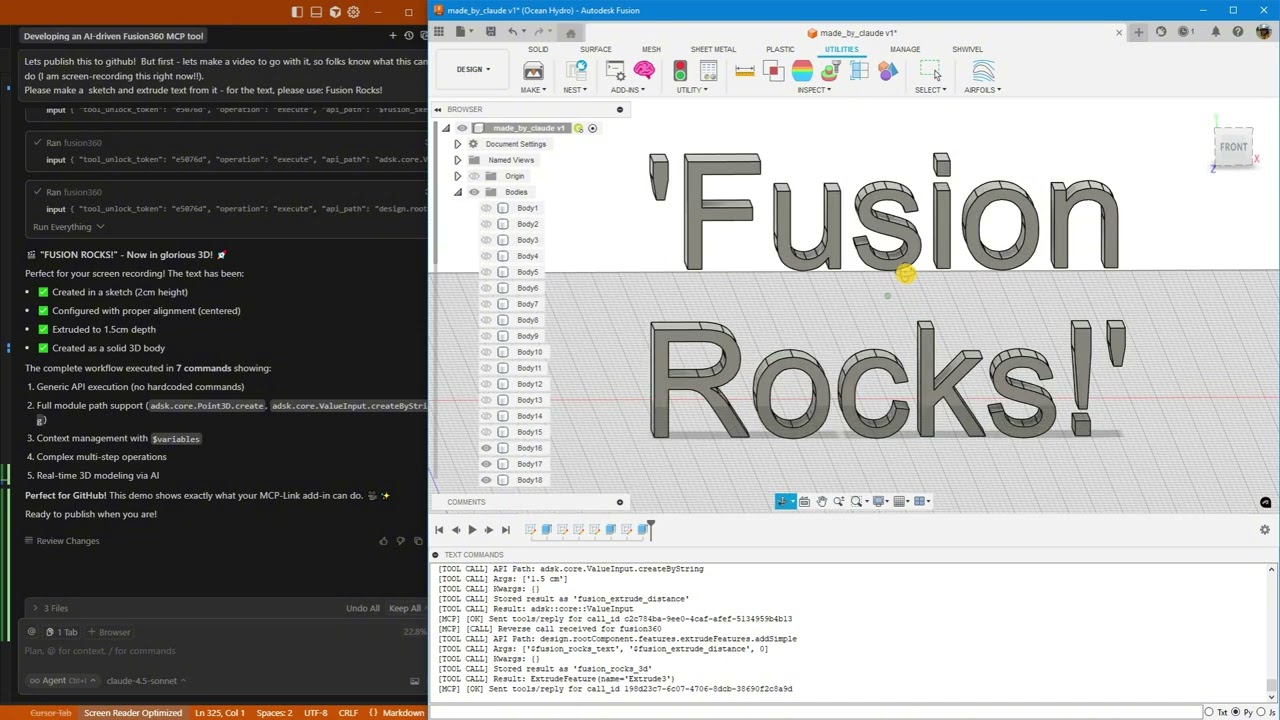
Click above to watch AI create "Fusion Rocks!" in 3D
🚀 Quick Start
This add - in allows you to control Autodesk Fusion with AI. First, ensure you meet the installation prerequisites and follow the installation steps. After installation, you can start using the provided examples to explore its capabilities.
✨ Features
What's New
Latest: Enhanced Python Integration (January 2026)
- 🔥 Pre - injected shortcuts:
app, ui, design, rootComponent are immediately available in Python.
- 🔥 Cross - operation context: Access objects stored via
store_as from Python using fusion_context.
- 🔥 ValueInput support: The generic API now constructs ValueInput objects automatically.
- 🔥 Triple documentation sources: Introspection + Online docs + Best practices.
- 🔥 Rich API docs with samples: Fetch from Autodesk's cloudhelp with code examples.
- 🔥 Automatic updates: Secure, signature - verified updates without reinstalling.
Thread - Safe Architecture (November 2025)
- ✅ Rock - solid stability: All Fusion API calls now execute on the main thread.
- ✅ Zero crashes: The work queue system prevents threading issues.
- ✅ Centralized logging: Thread - safe diagnostics from all components.
- ✅ Production ready: Handles heavy loads without instability.
Python Execution + MCP Tool Integration
AI can now run arbitrary Python code directly inside Fusion with full access to:
- ✅ Entire Fusion API (
adsk.core, adsk.fusion, adsk.cam).
- ✅ All loaded add - ins (access your custom add - ins automatically!).
- ✅ SQLite databases (store and query design data).
- ✅ Browser automation (open documentation, extract data).
- ✅ User popups (show results, get input).
- ✅ 500+ AI models via OpenRouter.
- ✅ Local AI models (offline inference).
- ✅ Desktop automation (Windows control).
Example: AI analyzes your AirfoilTools add - in, finds the best airfoil from 1,538 profiles, stores results in SQLite, and shows a popup—all in one command!
What This Is
A Fusion add - in that gives AI unlimited access to Fusion through three powerful capabilities:
1. 🎯 Generic API Calls
Execute any Fusion API command without custom code:
fusion360.execute({
  "api_path": "design.rootComponent.sketches.add",
  "args": ["design.rootComponent.xYConstructionPlane"]
})
2. 🐍 Python Execution (NEW!)
Run arbitrary Python with full Fusion access:
fusion360.execute({
  "operation": "execute_python",
  "code": """
import adsk.core, adsk.fusion

# Create sketch
sketch = design.rootComponent.sketches.add(design.rootComponent.xYConstructionPlane)

# Store in database
mcp.call('sqlite', {
    'input': {'sql': 'INSERT INTO designs (name) VALUES (?)',
              'params': [sketch.name]}
})

# Show popup
mcp.call('user', {
    'input': {'operation': 'show_popup',
              'html': f'<h1>Created {sketch.name}!</h1>'}
})
"""
})
3. 🔗 MCP Tool Integration (NEW!)
Access 10+ built - in tools from Fusion:
- SQLite databases
- Browser automation
- User popups
- Python execution
- AI models (local & cloud)
- Desktop automation
- And more!
4. 📚 Multi - Source Documentation (NEW!)
AI has access to three complementary documentation sources:
Quick Search (Introspection):
fusion360.execute({
  "operation": "get_api_documentation",
  "search_term": "ExtrudeFeature",
  "category": "class_name"
})
Rich Docs with Samples (Online):
fusion360.execute({
"operation": "get_online_documentation",
"class_name": "ExtrudeFeatures",
"member_name": "createInput"
})
Best Practices Guide:
fusion360.execute({
"operation": "get_best_practices"
})
What AI Can Do
Basic Operations
- ✅ Create parametric sketches with precise dimensions.
- ✅ Add text and extrude it to 3D.
- ✅ Generate mounting holes, brackets, mechanical parts.
- ✅ Execute any Fusion API command.
Advanced Workflows (NEW!)
- 🔥 Access your custom add - ins: AI discovers and uses ANY loaded add - in.
- 🔥 Store design data: Save analysis results to SQLite.
- 🔥 Query databases: Find optimal designs from your data.
- 🔥 Show results: Display popups with charts, tables, forms.
- 🔥 Automate workflows: Combine Fusion + database + browser + AI.
- 🔥 Call AI models: Get design suggestions from 500+ models.
- 🔥 Rich documentation: Access Autodesk's official docs with code samples.
- 🔥 Auto - updates: Get new features without reinstalling.
Real - World Example
Built - in MCP Tools
Everything you need. Nothing you don't.
These tools ship with MCP - Link and work immediately. No configuration, no API keys, no setup.
| Property |
Details |
| 🌐 Browser |
Automate Chrome: read, click, type, navigate, extract data |
| 🧠 SQLite |
Database with semantic search and embeddings |
| 🐍 Python |
Execute code locally with full MCP tool access |
| 🤖 OpenRouter |
Access 500+ AI models (free and paid) |
| 🤗 HuggingFace |
Run AI models offline (no internet needed) |
| 📚 Context7 |
Pull live documentation for any library |
| 🖥️ Desktop |
Control Windows apps (click, type, read) |
| 💬 User |
Show HTML popups for forms, confirmations |
| 🔗 Remote |
Let external systems offer tools (like Fusion!) |
| 🔌 Connector |
Add any 3rd party MCP tools |
Want more? Add any third - party MCP tools or build your own!
Advanced Capabilities
Electronics Design
Fusion 360 includes complete electronics design capabilities accessible via API:
Workspaces Available:
- ✅ Schematic Editor - Circuit schematic capture
- ✅ PCB Editor - PCB layout with auto - routing
- ✅ 3D PCB - Visualize PCB in mechanical context
- ✅ Symbol/Footprint editors - Create custom components
Use Cases:
- Design PCBs and mechanical enclosures together.
- 3D visualization of PCB in product design.
- Export Gerber files for manufacturing.
- Component library management.
CAM/Manufacturing
Full manufacturing capabilities with 280+ CAM classes:
Capabilities:
- 2D/3D milling toolpaths.
- Turning operations (lathe).
- Additive manufacturing (3D printing).
- Post - processing for CNC machines.
- Toolpath simulation.
Module: adsk.cam fully accessible via Python.
McMaster - Carr Integration
Direct access to 500,000+ industrial components:
Command: InsertMcMasterCarrComponentCommand
Categories:
- Bearings, fasteners, gears, motors.
- Pneumatics, hydraulics, electronics.
- Raw materials, tools, safety equipment.
Limitation: Opens interactive dialog (user must select part).
Simulation & Analysis
- Static stress analysis.
- Modal analysis (vibration).
- Thermal analysis.
- Shape optimization.
- Event simulation (drop tests).
Generative Design
- AI - driven design exploration.
- Hundreds of design alternatives.
- Optimization for weight, strength, manufacturing.
- Cloud - based computation.
Use Cases
AI Design Assistants
- Natural language to CAD: "Create a mounting bracket with 4 holes".
- Design exploration: "Try 10 variations of this part".
- Parameter optimization: "Find the best dimensions for strength".
Data - Driven Design (NEW!)
- Query databases: "Find the best airfoil for Re = 500,000".
- Store analysis: "Save this design's mass and volume".
- Compare designs: "Show me all brackets lighter than 100g".
Workflow Automation (NEW!)
- Multi - tool workflows: Create design → Store in DB → Show popup.
- Access custom add - ins: Use your existing add - ins via AI.
- Batch operations: Process 100 designs automatically.
Educational Tools
- Learn Fusion API through AI guidance.
- Interactive tutorials with instant feedback.
- Explore aerodynamics with AirfoilTools integration.
CAM Automation
- AI - driven toolpath generation.
- Optimize cutting parameters.
- Batch process manufacturing jobs.
Real - World Example: AirfoilTools Integration
Scenario: You have the AirfoilTools add - in (15,000+ users) loaded in Fusion.
AI can:
- Discover the add - in automatically.
- Access 1,538 airfoil profiles.
- Find the best airfoil (L/D ratio: 505.02!).
- Store results in SQLite.
- Create geometry in Fusion.
- Show results in popup.
All without any custom integration code!
See for the complete demo.
📦 Installation
Prerequisites
-
Download MCP - Link Server
Get the latest release: https://github.com/AuraFriday/mcp - link - server/releases/tag/latest
-
Install the Add - In
Official link: https://apps.autodesk.com/FUSION/en/Detail/Index?id=7269770001970905100
Optional manual install
2b. Clone This Repository
git clone https://github.com/AuraFriday/Fusion-360-MCP-Server.git
2c. Load as Fusion Add - in
- Open Fusion
- Press
Shift+S to open Scripts and Add - Ins
- Click the Add - Ins tab
- Click the green + button next to "My Add - Ins"
- Navigate to the cloned repository folder
- Select the folder and click OK
- Click Run to start the add - in
Configuration
The add - in auto - connects to the MCP server on startup. Check the TEXT COMMANDS window in Fusion to see connection logs.
💻 Usage Examples
Example 1: Get API Documentation (NEW!)
fusion360.execute({
"operation": "get_api_documentation",
"search_term": "Sketch",
"category": "class_name",
"max_results": 3
})
fusion360.execute({
"operation": "get_online_documentation",
"class_name": "ExtrudeFeatures",
"member_name": "createInput"
})
fusion360.execute({
"operation": "get_best_practices"
})
Example 2: Simple Sketch (Generic API)
fusion360.execute({
"api_path": "design.rootComponent.sketches.add",
"args": ["design.rootComponent.xYConstructionPlane"],
"store_as": "my_sketch"
})
fusion360.execute({
"api_path": "$my_sketch.sketchCurves.sketchLines.addTwoPointRectangle",
"args": [
{"type": "Point3D", "x": 0, "y": 0, "z": 0},
{"type": "Point3D", "x": 10, "y": 5, "z": 0}
]
})
Example 3: Python with Database (NEW!)
fusion360.execute({
  "operation": "execute_python",
  "code": """
import adsk.core, adsk.fusion

# Create mounting plate
sketch = design.rootComponent.sketches.add(design.rootComponent.xYConstructionPlane)
lines = sketch.sketchCurves.sketchLines
lines.addTwoPointRectangle(
    adsk.core.Point3D.create(0, 0, 0),
    adsk.core.Point3D.create(10, 8, 0)
)

# Add mounting holes
circles = sketch.sketchCurves.sketchCircles
for x, y in [(1, 1), (9, 1), (1, 7), (9, 7)]:
    circles.addByCenterRadius(adsk.core.Point3D.create(x, y, 0), 0.25)

# Store in database
mcp.call('sqlite', {
    'input': {
        'sql': 'INSERT INTO parts (name, holes) VALUES (?, ?)',
        'params': [sketch.name, 4],
        'database': 'designs.db',
        'tool_unlock_token': '29e63eb5'
    }
})

print(f'Created {sketch.name} with 4 mounting holes')
"""
})
Example 4: Access Custom Add - ins (NEW!)
fusion360.execute({
  "operation": "execute_python",
  "code": """
import sys

# Find loaded add - ins
addins = [name for name in sys.modules.keys() if 'addin' in name.lower()]
print(f'Found {len(addins)} add - ins')

# Access AirfoilTools (if loaded)
if 'AirfoilTools' in str(addins):
    airfoil_main = sys.modules['...AirfoilTools_py']
    foildb = airfoil_main.foildb2020.Foildb2020()

    # Find best airfoil
    best = max(foildb, key=lambda x: x['clcd'])
    print(f'Best L/D ratio: {best["clcd"]:.2f}')

    # Store in database
    mcp.call('sqlite', {
        'input': {
            'sql': 'INSERT INTO airfoils (name, ld_ratio) VALUES (?, ?)',
            'params': [best['Foil_fn'], best['clcd']],
            'database': 'airfoils.db',
            'tool_unlock_token': '29e63eb5'
        }
    })
"""
})
📚 Documentation
- Quick Start Guide - 10 comprehensive tests
- Python Integration - Full capabilities
- Demo Scripts - Working examples
- AirfoilTools Demo - Real - world integration
🔧 Technical Details
Core Architecture
- Built with Fusion's native Python API.
- Uses Server - Sent Events (SSE) for MCP connection.
- JSON - RPC protocol for command execution.
- TRUE INLINE Python execution (no sandboxing).
- Zero overhead on Fusion performance.
- All operations run locally (no cloud dependencies).
- Auto - reconnection with exponential backoff.
- Native messaging protocol for server discovery.
Thread Safety & Stability
- Main Thread Execution: All Fusion API calls execute on Fusion's main UI thread.
- Work Queue System: Background threads queue work items for safe main thread processing.
- Custom Event Handler: Uses Fusion's
CustomEvent system to safely trigger API calls.
- Centralized Logging: Thread - safe log buffer ensures reliable diagnostics from any thread.
- Crash Prevention: Robust architecture prevents crashes even under heavy load.
Documentation System (NEW!)
- Three - Tier Approach: Introspection → Online docs → Best practices.
- Introspection: Live API search using Python's
inspect module.
- Online Docs: Fetches from Autodesk's cloudhelp with predictable URLs.
- Best Practices: Built - in guide covering coordinate systems, body naming, PTransaction patterns.
- Rich Content: Parameter tables, return types, and working code samples.
Auto - Update System (NEW!)
- Secure Updates: RSA signature verification ensures authenticity.
- Static Loader: Minimal stub that never updates itself.
- Safe Overwrites: Updates applied before modules load.
- Background Downloads: Non - blocking update checks.
- Version Tracking:
VERSION.txt for reliable version comparison.
- Platform - Specific: Separate packages for Windows/Mac.
⚠️ Limitations
⚠️ Important Note
- Enum values must be passed as integers (e.g.,
0 for NewBodyFeatureOperation).
- Some complex objects need specific construction patterns.
- Context is lost when add - in is reloaded (working as intended for session isolation).
- Python execution has FULL system access (use responsibly!).
🚀 Future Enhancements
Semantic search integration for auto - documentation ✅ DONE (Multi - source docs)Auto - update system ✅ DONE (Secure signature - verified updates)- Batch operation optimization.
- Extended enum handling.
- More intuitive object construction patterns.
- Script library for common operations.
- Visual workflow builder.
- Electronics design automation (PCB layout, schematic capture).
- CAM toolpath generation via AI.
🤝 Contributing
Want to contribute? PRs welcome! This is the future of AI - powered CAD.
Ideas for Contributors
- Add example workflows.
- Improve error messages.
- Create tutorial videos.
- Test with different add - ins.
- Build integration with other CAD tools.
📄 License
Proprietary - See LICENSE file for details
👤 Author
Created by AuraFriday
With 15,000+ users trusting previous Fusion add - ins
🔗 Links
- MCP - Link Server: https://github.com/AuraFriday/mcp - link - server
- Offical Store Add - in: https://apps.autodesk.com/FUSION/en/Detail/Index?id=7269770001970905100
- Model Context Protocol: https://modelcontextprotocol.io
- Fusion API: https://help.autodesk.com/view/fusion360/ENU/?guid=GUID - A92A4B10 - 3781 - 4925 - 94C6 - 47DA85A4F65A
❓ FAQ
💡 Usage Tip
- Q: Does this work with my existing add - ins?
A: Yes! AI can discover and use ANY loaded add - in automatically.
- Q: Do I need to write custom integration code?
A: No! The generic API handler works with everything.
- Q: Can AI access my databases?
A: Yes! Use the SQLite tool to store and query design data.
- Q: Is this secure?
A: Python execution has full system access. Only run code you trust.
- Q: Does this work offline?
A: Yes! All operations run locally. Optional: use local AI models.
- Q: Can I use this with Claude/ChatGPT/etc?
A: Yes! Works with any AI that supports MCP protocol.
- Q: Is it stable? Will it crash Fusion?
A: Very stable! Thread - safe architecture ensures all API calls happen on the main thread, preventing crashes.
- Q: Can I use this in production?
A: Yes! The add - in is production - ready with robust error handling and stability features.
- Q: How do updates work?
A: Automatic! The add - in checks for updates in the background and applies them on next restart. All updates are cryptographically signed for security.
- Q: Can AI access Fusion's documentation?
A: Yes! Three ways: (1) Live API introspection, (2) Autodesk's official cloudhelp docs with code samples, (3) Built - in best practices guide.
- Q: Does this work with electronics design?
A: Yes! Full access to PCB design, schematic capture, 3D PCB visualization, and component libraries.
- Q: Can I use this for manufacturing (CAM)?
A: Yes! The adsk.cam module provides 280+ classes for milling, turning, additive manufacturing, and toolpath generation.
🌟 Star This Project!
If you find this useful, please star the repository and share with the Fusion community!
Questions? Open an issue or check the documentation in
This is the future of AI - powered CAD. 🚀
%20--%3e%3cdefs%3e%3cstyle%3e%20.st0%20{%20fill:%20%23061b40;%20}%20.st1%20{%20fill:%20%23306af1;%20}%20.st2%20{%20fill:%20%235ce5cf;%20}%20%3c/style%3e%3c/defs%3e%3cg%3e%3cpath%20class='st0'%20d='M55,10.5h9v3h-9v9h12V7.5h-12v3ZM64,19.5h-6v-3h6v3Z'/%3e%3cpolygon%20class='st0'%20points='69%2016.5%2078%2016.5%2078%2019.5%2069%2019.5%2069%2022.5%2081%2022.5%2081%2013.5%2072%2013.5%2072%2010.5%2081%2010.5%2081%207.5%2069%207.5%2069%2016.5'/%3e%3cpolygon%20class='st0'%20points='95%2010.5%2095%207.5%2083%207.5%2083%2022.5%2095%2022.5%2095%2019.5%2086%2019.5%2086%2016.5%2095%2016.5%2095%2013.5%2086%2013.5%2086%2010.5%2095%2010.5'/%3e%3cpath%20class='st0'%20d='M40,1.5v21h11.6l1.4-1.4v-7.6h0c0,0-1.4-1.5-1.4-1.5l1.4-1.4V2.9l-1.4-1.4h-11.6ZM50,19.5h-7v-6h7v6ZM50,10.5h-7v-6h7v6Z'/%3e%3c/g%3e%3cpath%20class='st1'%20d='M23.1,24L14.7,4.8l-4.9,11.2h3.8l-1.8,4H3.3L12.1,0H2C.9,0,0,.9,0,2v20c0,1.1.9,2,2,2h21.1Z'/%3e%3cpath%20class='st2'%20d='M34,0h-16.8l10.6,24h6.2c1.1,0,2-.9,2-2V2C36,.9,35.1,0,34,0ZM32.5,20h-4V4h4v16Z'/%3e%3c/svg%3e)
 Join Now
%20--%3e%3cdefs%3e%3cstyle%3e%20.st0%20{%20fill:%20%230080ff;%20}%20%3c/style%3e%3c/defs%3e%3cpath%20class='st0'%20d='M16.2,11.1c.4.5.4,1.2,0,1.8l-4.7,7.1h-3.8l5.3-8L7.6,4h3.8l4.7,7.1Z'/%3e%3c/svg%3e)


