%20--%3e%3cdefs%3e%3cstyle%3e%20.st0%20{%20fill:%20%23061b40;%20}%20.st1%20{%20fill:%20%23306af1;%20}%20.st2%20{%20fill:%20%235ce5cf;%20}%20%3c/style%3e%3c/defs%3e%3cg%3e%3cpath%20class='st0'%20d='M55,10.5h9v3h-9v9h12V7.5h-12v3ZM64,19.5h-6v-3h6v3Z'/%3e%3cpolygon%20class='st0'%20points='69%2016.5%2078%2016.5%2078%2019.5%2069%2019.5%2069%2022.5%2081%2022.5%2081%2013.5%2072%2013.5%2072%2010.5%2081%2010.5%2081%207.5%2069%207.5%2069%2016.5'/%3e%3cpolygon%20class='st0'%20points='95%2010.5%2095%207.5%2083%207.5%2083%2022.5%2095%2022.5%2095%2019.5%2086%2019.5%2086%2016.5%2095%2016.5%2095%2013.5%2086%2013.5%2086%2010.5%2095%2010.5'/%3e%3cpath%20class='st0'%20d='M40,1.5v21h11.6l1.4-1.4v-7.6h0c0,0-1.4-1.5-1.4-1.5l1.4-1.4V2.9l-1.4-1.4h-11.6ZM50,19.5h-7v-6h7v6ZM50,10.5h-7v-6h7v6Z'/%3e%3c/g%3e%3cpath%20class='st1'%20d='M23.1,24L14.7,4.8l-4.9,11.2h3.8l-1.8,4H3.3L12.1,0H2C.9,0,0,.9,0,2v20c0,1.1.9,2,2,2h21.1Z'/%3e%3cpath%20class='st2'%20d='M34,0h-16.8l10.6,24h6.2c1.1,0,2-.9,2-2V2C36,.9,35.1,0,34,0ZM32.5,20h-4V4h4v16Z'/%3e%3c/svg%3e)
Apify MCP Server
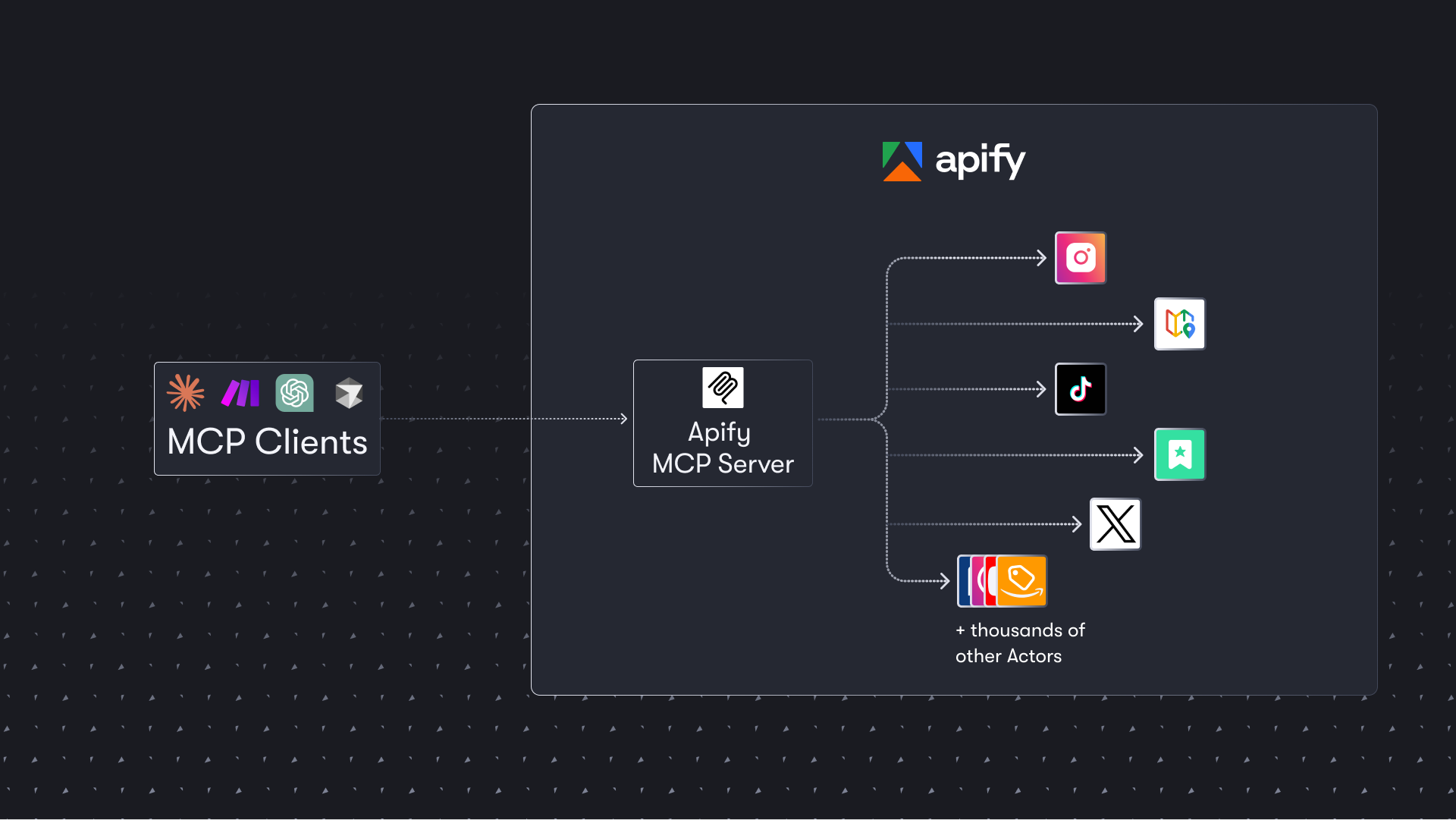
The Apify MCP Server is a tool based on the Model Context Protocol (MCP) that allows AI assistants to extract data from websites such as social media, search engines, and e-commerce through thousands of ready-to-use crawlers, scrapers, and automation tools (Apify Actors). It supports OAuth and Skyfire proxy payment and can be integrated into MCP clients such as Claude and VS Code through HTTPS endpoints or local stdio.
rating : 5 points
downloads : 14.9K
What is the Apify MCP Server?
The Apify MCP Server is a server based on the Model Context Protocol that allows AI assistants (such as Claude, Cursor, VS Code, etc.) to directly access and use thousands of ready-to-use web crawlers, data extraction, and automation tools (called Actors) on the Apify platform. Through this server, AI can easily obtain data from various websites, including social media, search engines, map services, e-commerce platforms, etc.How to use the Apify MCP Server?
You can use the Apify MCP Server in two ways: 1) Use the hosted server (recommended): Visit https://mcp.apify.com, which supports OAuth authentication; 2) Run locally: Start the server locally through the command-line tool. Both methods require an Apify API token for authentication.Use cases
The Apify MCP Server is particularly suitable for scenarios that require real-time data acquisition and analysis, such as market research, competitive analysis, social media monitoring, price tracking, content aggregation, etc. AI assistants can automatically select appropriate tools to complete tasks without manual intervention.Main features
Dynamic tool discovery
AI assistants can search for and discover new tools (Actors) in the Apify Store and dynamically add and use them as needed.
OAuth support
The hosted server supports OAuth authentication. Users can connect via a simple URL without manually configuring the API token.
Skyfire proxy payment
Supports the Skyfire proxy payment system. AI assistants can independently pay for Actor running fees without an API token.
Multi-client compatibility
Compatible with all clients that support the MCP protocol, including Claude Desktop, VS Code, Cursor, etc.
Structured data output
Supports output mode inference to ensure that the structured data returned by Actors can be correctly understood and processed by AI assistants.
Flexible tool configuration
You can flexibly configure the tools and functions to be loaded through URL parameters or command-line options.
Advantages
Access thousands of ready-to-use web crawlers and automation tools
Complete complex data extraction tasks without writing code
Support dynamic tool discovery. AI can independently find appropriate tools
Provide hosted services with simple configuration and support for OAuth
Be compatible with various AI assistants and development tools
Support proxy payment. AI can independently complete payment operations
Limitations
Require an Apify account and API token (the hosted service can be simplified through OAuth)
Some advanced features may require paid use
When running locally, you cannot access rented Actors and can only use the added tools
There are length limits for tool descriptions and enumeration values (the description is limited to a maximum of 500 characters)
The SSE transmission protocol will be deprecated on April 1, 2026, and you need to update the client configuration
How to use
Get an Apify account and API token
Visit the Apify official website to register an account and generate an API token in the settings.
%20--%3e%3cdefs%3e%3cstyle%3e%20.st0%20{%20fill:%20%230080ff;%20}%20%3c/style%3e%3c/defs%3e%3cpath%20class='st0'%20d='M16.2,11.1c.4.5.4,1.2,0,1.8l-4.7,7.1h-3.8l5.3-8L7.6,4h3.8l4.7,7.1Z'/%3e%3c/svg%3e)
Choose the usage method
Decide whether to use the hosted server (recommended) or run locally. The hosted server is simpler and supports OAuth; running locally is suitable for scenarios that require full control.
Configure the MCP client
According to the client you are using (Claude, VS Code, etc.), add the Apify MCP server configuration.
Start using
In the AI assistant, you can now search for and use Apify Actors to complete various data extraction tasks.
Usage examples
Market research: Collect competitor information
AI assistants can automatically search for relevant e-commerce crawlers to collect product information, prices, and reviews of competitors.
Social media monitoring
Monitor the discussion of specific brands or topics on social media.
Local business information collection
Collect business contact information and service information in a specific area.
Content aggregation
Aggregate the latest reports on a specific topic from multiple news websites.
Frequently Asked Questions
Is the Apify MCP Server free?
Do I need programming knowledge to use it?
Which AI assistants are supported?
How fast is the data extraction?
How to ensure the legality of data extraction?
What should I do after the SSE transmission is deprecated?
Related resources
Official documentation
Detailed installation, configuration, and usage guides
Configuration page
Interactive configuration tool to generate client configuration
Apify Store
Browse available Actors (web crawlers and automation tools)
Video tutorial
How to integrate over 8000 Apify Actors into Claude
GitHub repository
Source code and contribution guide
Tester MCP Client
A test client to experience Apify MCP without configuration
Skyfire integration documentation
Detailed configuration guide for the proxy payment system


Gitlab MCP Server
Certified
The GitLab MCP server is a project based on the Model Context Protocol that provides a comprehensive toolset for interacting with GitLab accounts, including code review, merge request management, CI/CD configuration, and other functions.
TypeScript
33.0K
4.3 points

Notion Api MCP
Certified
A Python-based MCP Server that provides advanced to-do list management and content organization functions through the Notion API, enabling seamless integration between AI models and Notion.
Python
28.3K
4.5 points

Markdownify MCP
Markdownify is a multi-functional file conversion service that supports converting multiple formats such as PDFs, images, audio, and web page content into Markdown format.
TypeScript
44.6K
5 points

Duckduckgo MCP Server
Certified
The DuckDuckGo Search MCP Server provides web search and content scraping services for LLMs such as Claude.
Python
95.2K
4.3 points

Figma Context MCP
Framelink Figma MCP Server is a server that provides access to Figma design data for AI programming tools (such as Cursor). By simplifying the Figma API response, it helps AI more accurately achieve one - click conversion from design to code.
TypeScript
79.4K
4.5 points

Unity
Certified
UnityMCP is a Unity editor plugin that implements the Model Context Protocol (MCP), providing seamless integration between Unity and AI assistants, including real - time state monitoring, remote command execution, and log functions.
C#
41.5K
5 points

Gmail MCP Server
A Gmail automatic authentication MCP server designed for Claude Desktop, supporting Gmail management through natural language interaction, including complete functions such as sending emails, label management, and batch operations.
TypeScript
28.3K
4.5 points

Minimax MCP Server
The MiniMax Model Context Protocol (MCP) is an official server that supports interaction with powerful text-to-speech, video/image generation APIs, and is suitable for various client tools such as Claude Desktop and Cursor.
Python
66.0K
4.8 points