🚀 Code Executor MCP
Code Executor MCP helps you break through the limit of using only 2 - 3 MCP servers. With it, you can orchestrate all MCP tools, save up to 98% of tokens, and gain unlimited access to various tools.



🚀 Quick Start
Option 1: Interactive Setup Wizard (Recommended)
Don't configure manually. Our wizard does everything:
npm install -g code-executor-mcp
code-executor-mcp setup
What the wizard does:
- 🔍 Scans for existing MCP configs (Claude Code
~/.claude.json, Cursor ~/.cursor/mcp.json, project .mcp.json)
- ⚙️ Configures with smart defaults (or customize interactively)
- 🤖 NEW: Writes complete MCP configuration (sampling + security + sandbox + performance)
- 📦 Generates type-safe TypeScript/Python wrappers for autocomplete
- 📅 Optional: Sets up daily sync to keep wrappers updated
Complete Configuration (all written automatically):
- AI Sampling: Multi - provider support (Anthropic, OpenAI, Gemini, Grok, Perplexity)
- Security: Audit logging, content filtering, project restrictions
- Sandbox: Deno/Python execution with timeouts
- Performance: Rate limiting, schema caching, execution timeouts
Smart defaults (just press Enter):
- Port: 3333 | Timeout: 120s | Rate limit: 60/min
- Audit logs:
~/.code-executor/audit-logs/
- Sampling: Disabled (enable optionally with API key)
Supported AI Tools: Claude Code and Cursor (more coming soon)
First - Run Detection:
If you try to run code-executor-mcp without configuration:
❌ No MCP configuration found

📝 To configure code-executor-mcp, run:
   code-executor-mcp setup

Configuration will be created at: ~/.claude.json
What are Wrappers?
The wizard generates TypeScript/Python wrapper functions for your MCP tools:
Before (manual):
const file = await callMCPTool('mcp__filesystem__read_file', {
  path: '/src/app.ts'
});
After (wrapper):
import { filesystem } from './mcp-wrappers';
const file = await filesystem.readFile({ path: '/src/app.ts' });
Benefits:
- ✅ Type - safe with full IntelliSense/autocomplete
- ✅ Self - documenting JSDoc comments from schemas
- ✅ No need to remember exact tool names
- ✅ Matches actual MCP tool APIs (generated from schemas)
Keeping Wrappers Updated:
The wizard can set up daily sync (optional) to automatically regenerate wrappers:
- macOS: launchd plist runs at 4 - 6 AM
- Linux: systemd timer runs at 4 - 6 AM
- Windows: Task Scheduler runs at 4 - 6 AM
Daily sync re - scans your AI tool configs and project config for new/removed MCP servers. You can also manually update anytime with code-executor-mcp setup.
Option 2: Manual Configuration
1. Install
npm install -g code-executor-mcp
2. Configure
IMPORTANT: Code - executor discovers and merges MCP servers from BOTH locations:
- Global:
~/.claude.json (cross - project MCPs like voice - mode, personal tools)
- Project:
.mcp.json (team - shared MCPs in your project root)
Config Merging: Global MCPs + Project MCPs = All available (project overrides global for duplicate names)
Add to your project .mcp.json or global ~/.claude.json:
{
  "mcpServers": {
    "code-executor": {
      "command": "npx",
      "args": ["-y", "code-executor-mcp"],
      "env": {
        "MCP_CONFIG_PATH": "/full/path/to/this/.mcp.json",
        "DENO_PATH": "/path/to/.deno/bin/deno"
      }
    },
    "filesystem": {
      "command": "npx",
      "args": ["-y", "@modelcontextprotocol/server-filesystem", "/home/user"]
    },
    "playwright": {
      "command": "npx",
      "args": ["-y", "@playwright/mcp", "--headless"]
    }
  }
}
Configuration Guide:
MCP_CONFIG_PATH: Optional - points to project .mcp.json (still discovers global ~/.claude.json)DENO_PATH: Run which deno to find it (required for TypeScript execution)- Global MCPs (
~/.claude.json): Personal servers available across all projects
- Project MCPs (
.mcp.json): Team - shared servers in version control
- Connection Flow: Claude Code → code - executor ONLY, then code - executor → all other MCPs
Quick Setup:
which deno
realpath .mcp.json
ls ~/.claude.json
Minimal (Python - only):
{
  "mcpServers": {
    "code-executor": {
      "command": "npx",
      "args": ["-y", "code-executor-mcp"],
      "env": {
        "MCP_CONFIG_PATH": "/path/to/.mcp.json",
        "PYTHON_ENABLED": "true"
      }
    }
  }
}
3. Use
Claude can now access any MCP tool through code execution:
const result = await callMCPTool('mcp__filesystem__read_file', {
path: './package.json'
});
console.log(result);
That's it. No configuration, no allowlists, no manual tool setup.
✨ Features
| Feature |
Description |
| 98% Token Savings |
141k → 1.6k tokens (47 tools → 2 tools) |
| Unlimited MCPs |
Access 6,490+ MCP servers without context limits |
| Multi - Step Workflows |
Chain multiple MCP calls in one execution |
| Auto - Discovery |
AI agents find tools on - demand (0 token cost) |
| Deep Validation |
AJV schema validation with helpful error messages |
| Security |
Sandboxed (Deno/Python), allowlists, audit logs, rate limiting |
| Production Ready |
TypeScript, 606 tests, 95%+ coverage, Docker support |
📦 Installation
npm (Recommended)
npm install -g code-executor-mcp
code-executor-mcp
Docker (Production)
Quick Start:
docker pull aberemia24/code-executor-mcp:latest
docker run -p 3333:3333 aberemia24/code-executor-mcp:latest
With docker - compose (Recommended):
cp docker-compose.example.yml docker-compose.yml
docker-compose up -d
docker-compose logs -f
First - Run Auto - Configuration:
Docker deployment automatically generates complete MCP configuration from environment variables on first run:
- ✅ All environment variables → comprehensive config
- ✅ Includes sampling, security, sandbox, and performance settings
- ✅ Config saved to
/app/config/.mcp.json
- ✅ Persistent across container restarts (use volume mount)
See DOCKER_TESTING.md for security details and docker-compose.example.yml for all available configuration options.
Local Development
git clone https://github.com/aberemia24/code-executor-MCP.git
cd code-executor-mcp
npm install && npm run build
npm run server
💻 Usage Examples
Basic Usage
mcp__filesystem__read_file
mcp__filesystem__write_file
mcp__git__commit
mcp__browser__navigate
... 43 more tools
run-typescript-code
run-python-code
Inside the sandbox, access ANY MCP tool on - demand:
const file = await callMCPTool('mcp__filesystem__read_file', { path: '/src/app.ts' });
const review = await callMCPTool('mcp__zen__codereview', { code: file });
await callMCPTool('mcp__git__commit', { message: review.suggestions });
Advanced Usage
Real - World Example
Task: "Review auth.ts for security issues and commit fixes"
Without code - executor (impossible - hit context limit):
Can't enable: filesystem + git + zen codereview
Pick 2, manually do the 3rd
With code - executor (single AI message):
const code = await callMCPTool('mcp__filesystem__read_file', {
path: '/src/auth.ts'
});
const review = await callMCPTool('mcp__zen__codereview', {
step: 'Security audit',
code: code,
step_number: 1,
total_steps: 1
});
const fixed = review.suggestions.replace(/timing-attack/g, 'constant-time');
await callMCPTool('mcp__filesystem__write_file', {
path: '/src/auth.ts',
content: fixed
});
await callMCPTool('mcp__git__commit', {
message: 'fix: constant-time token comparison'
});
console.log('Security fixes applied and committed');
All in ONE tool call. Variables persist, no context switching.
📚 Documentation
- AGENTS.md - Repository guidelines for AI agents
- CONTRIBUTING.md - Development setup and workflow
- SECURITY.md - Security model and threat analysis
- DOCKER_TESTING.md - Docker security details
- CHANGELOG.md - Version history
🔧 Technical Details
The Problem
You can't use more than 2 - 3 MCP servers before context exhaustion kills you.
You're forced to choose: filesystem OR browser OR git OR AI tools. Never all of them.
The Solution
Disable all MCPs. Enable only code-executor-mcp.
How Progressive Disclosure Works
sequenceDiagram
    participant C as Claude/Cursor
    participant E as Code Executor
    participant M as Other MCPs

    Note over C: ❌ Traditional: Load 50+ tools (141k tokens)

    Note over C: ✅ Code Executor: Load 2 tools (1.6k tokens)
    C->>E: run-typescript-code

    rect rgb(240, 248, 255)
        Note right of E: Sandbox (on-demand discovery)
        E->>M: callMCPTool('mcp__filesystem__read_file')
        M-->>E: Return data
    end

    E-->>C: Return result
Traditional MCP exposes all 47 tools upfront (141k tokens). Code Executor exposes 2 tools with outputSchema (1.6k tokens), loading others on - demand inside the sandbox when needed.
MCP Sampling (Beta) - LLM - in - the - Loop Execution
What is Sampling?
MCP Sampling allows TypeScript and Python code running in sandboxed environments to invoke Claude (via Anthropic's API) through a simple interface. Your code can now "ask Claude for help" mid - execution.
Quick Example
TypeScript:
const result = await callMCPTool('mcp__code-executor__executeTypescript', {
code: `
// Read a file
const code = await callMCPTool('mcp__filesystem__read_file', {
path: './auth.ts'
});
// Ask Claude to analyze it
const analysis = await llm.ask(
'Analyze this code for security vulnerabilities: ' + code
);
console.log(analysis);
`,
enableSampling: true,
allowedTools: ['mcp__filesystem__read_file']
});
console.log('Rounds:', result.samplingMetrics.totalRounds);
console.log('Tokens:', result.samplingMetrics.totalTokens);
Python:
code = """
import json
# Read data
data = call_mcp_tool('mcp__filesystem__read_file', {'path': './data.json'})
# Ask Claude to summarize
summary = await llm.ask(f'Summarize this data: {data}')
print(summary)
"""
result = call_mcp_tool('mcp__code-executor__executePython', {
'code': code,
'enableSampling': True
})
API Reference
TypeScript API:
llm.ask(prompt: string, options?) - Simple query, returns response textllm.think({messages, model?, maxTokens?, systemPrompt?}) - Multi - turn conversation
Python API:
llm.ask(prompt: str, system_prompt='', max_tokens=1000) - Simple queryllm.think(messages, model='', max_tokens=1000, system_prompt='') - Multi - turn conversation
Security Controls
| Control |
Description |
| Rate Limiting |
Max 10 rounds, 10,000 tokens per execution (configurable) |
| Content Filtering |
Auto - redacts secrets (API keys, tokens) and PII (emails, SSNs) |
| System Prompt Allowlist |
Only pre - approved prompts accepted (prevents prompt injection) |
| Bearer Token Auth |
256 - bit secure token per bridge session |
| Localhost Binding |
Bridge server only accessible locally (no external access) |
| Audit Logging |
All calls logged with SHA - 256 hashes (no plaintext secrets) |
Configuration
Enable Sampling:
Option 1 - Per - Execution (recommended):
{ enableSampling: true }
Option 2 - Environment Variable:
export CODE_EXECUTOR_SAMPLING_ENABLED=true
export CODE_EXECUTOR_MAX_SAMPLING_ROUNDS=10
export CODE_EXECUTOR_MAX_SAMPLING_TOKENS=10000
Option 3 - Config File (~/.code-executor/config.json):
{
  "sampling": {
    "enabled": true,
    "maxRoundsPerExecution": 10,
    "maxTokensPerExecution": 10000,
    "allowedSystemPrompts": [
      "",
      "You are a helpful assistant",
      "You are a code analysis expert"
    ]
  }
}
Hybrid Architecture
Code Executor automatically detects the best sampling method:
- MCP SDK Sampling (free) - If your MCP client supports
sampling/createMessage
- Direct Anthropic API (paid) - Fallback if MCP sampling unavailable (requires
ANTHROPIC_API_KEY)
⚠️ Claude Code Limitation (as of November 2025):
Claude Code does not support MCP sampling yet (Issue #1785). When using Claude Code, sampling will fall back to Direct API mode (requires ANTHROPIC_API_KEY).
Compatible clients with MCP sampling:
- ✅ VS Code (v0.20.0+)
- ✅ GitHub Copilot
- ❌ Claude Code (pending Issue #1785)
When Claude Code adds sampling support, no code changes are needed - it will automatically switch to free MCP sampling.
Security (Enterprise - Grade)
Code Executor doesn't just "run code." It secures it:
| Feature |
Implementation |
| Sandbox Isolation |
Deno (TypeScript) with restricted permissions, Pyodide WebAssembly (Python) |
| File Access Control |
Non - root user (UID 1001), read - only root FS, explicit project path allowlist |
| Network Policy |
NO internet by default, explicit domain allowlist required |
| Path Validation |
Symlink resolution, directory traversal protection |
| Audit Logging |
Every execution logged to ~/.code-executor/audit.jsonl with timestamps |
| Rate Limiting |
30 requests/min default (configurable per MCP) |
| Dangerous Pattern Detection |
Blocks eval, exec, import, pickle.loads |
| Schema Validation |
AJV deep validation before execution |
| SSRF Protection |
Blocks AWS metadata, localhost, private IPs |
Example: Block all internet except GitHub API:
{
  "security": {
    "allowedDomains": ["api.github.com"],
    "allowedProjects": ["/home/user/projects"]
  }
}
Sandbox Architecture:
- Deno (TypeScript): V8 isolate, explicit permissions (--allow - read=/tmp), no shell access
- Pyodide (Python): WebAssembly sandbox, virtual filesystem, network restricted to MCP proxy only
- Docker (Optional): Non - root container, read - only root, minimal attack surface
See SECURITY.md for complete threat analysis and security model.
Advanced Usage
Allowlists (Optional Security)
Restrict which tools can be executed:
await callMCPTool('mcp__code-executor__run-typescript-code', {
  code: `
    // This works
    await callMCPTool('mcp__filesystem__read_file', {...});

    // This fails - not in allowlist
    await callMCPTool('mcp__git__push', {...});
  `,
  allowedTools: ['mcp__filesystem__read_file']
});
Discovery Functions
AI agents can explore available tools:
const tools = await discoverMCPTools();
const fileTools = await searchTools('file read write');
const schema = await getToolSchema('mcp__filesystem__read_file');
Zero token cost - discovery functions hidden from AI agent's tool list.
MCP Sampling: LLM - in - the - Loop Execution
Enable AI to autonomously call other AIs inside sandboxed code for iterative problem - solving, multi - agent collaboration, and complex workflows.
Key Features:
- Multi - Provider Support: Anthropic, OpenAI, Gemini, Grok, Perplexity
- Hybrid Mode: Free MCP sampling with automatic fallback to paid API
- Simple API:
llm.ask(prompt) and llm.think(messages) helpers
- Security: Rate limiting, content filtering, localhost - only bridge
Setup:
cp .env.example .env
echo "CODE_EXECUTOR_SAMPLING_ENABLED=true" >> .env
echo "CODE_EXECUTOR_AI_PROVIDER=gemini" >> .env
echo "GEMINI_API_KEY=your_key_here" >> .env
{
"code-executor": {
"command": "/path/to/start-with-env.sh"
}
}
See for complete setup guide.
Basic Usage:
const answer = await llm.ask('What is 2+2?');
console.log(answer);
const analysis = await llm.think([
{ role: 'system', content: 'You are a code reviewer' },
{ role: 'user', content: 'Review this code: ...' }
]);
Advanced Example - Multi - Agent Code Review:
5 AI agents collaborate to review, secure, refactor, test, and document code:
const review = await llm.ask('Review this code and list 5 issues...');
const security = await llm.ask('Analyze for vulnerabilities...');
const refactored = await llm.ask('Refactor using ES6+...');
const tests = await llm.ask('Generate 3 Vitest test cases...');
const docs = await llm.ask('Write JSDoc comments...');
Real - World Results:
- 5 AI agents, 10 seconds, ~2,600 tokens
- Complete code transformation: review → secure → refactor → test → document
- See for full working example
Use Cases:
- 🤖 Multi - agent systems (code review, planning, execution)
- 🔄 Iterative refinement (generate → validate → improve loop)
- 🧪 Autonomous testing (generate tests, run them, fix failures)
- 📚 Auto - documentation (analyze code, write docs, validate examples)
Multi - Action Workflows
Complex automation in a single tool call:
await callMCPTool('mcp__code-executor__run-typescript-code', {
code: `
await callMCPTool('mcp__playwright__launch', { headless: false });
await callMCPTool('mcp__playwright__navigate', { url: 'https://example.com' });
const title = await callMCPTool('mcp__playwright__evaluate', {
script: 'document.title'
});
console.log('Page title:', title);
`,
allowedTools: ['mcp__playwright__*']
});
State persists across calls - no context switching.
Python Execution (Pyodide WebAssembly)
Secure Python execution with Pyodide sandbox:
Enable Python:
export PYTHON_SANDBOX_READY=true
{
"executors": {
"python": {
"enabled": true
}
}
}
Example - Python with MCP tools:
import asyncio
async def main():
tools = await discover_mcp_tools()
print(f'Found {len(tools)} tools')
content = await call_mcp_tool('mcp__filesystem__read_file', {
'path': '/tmp/data.json'
})
print(f'File content: {content}')
import json
data = json.loads(content)
result = [x * 2 for x in data['numbers']]
print(f'Processed: {result}')
asyncio.run(main())
Security guarantees:
- ✅ WebAssembly sandbox (same security as Deno)
- ✅ Virtual filesystem (no host file access)
- ✅ Network restricted to authenticated MCP proxy
- ✅ No subprocess spawning
- ✅ Memory limited by V8 heap
Limitations:
- Pure Python only (no native C extensions unless WASM - compiled)
- ~2 - 3s first load (Pyodide npm package), <100ms cached
- No multiprocessing/threading (use async/await)
- 10 - 30% slower than native Python (WASM overhead acceptable for security)
See SECURITY.md for complete security model.
📄 License
MIT - See LICENSE
Links
- npm: https://www.npmjs.com/package/code-executor-mcp
- Docker Hub: https://hub.docker.com/r/aberemia24/code-executor-mcp
- GitHub: https://github.com/aberemia24/code-executor-MCP
- Issues: https://github.com/aberemia24/code-executor-MCP/issues
Built with Claude Code | Based on Anthropic's Code Execution with MCP
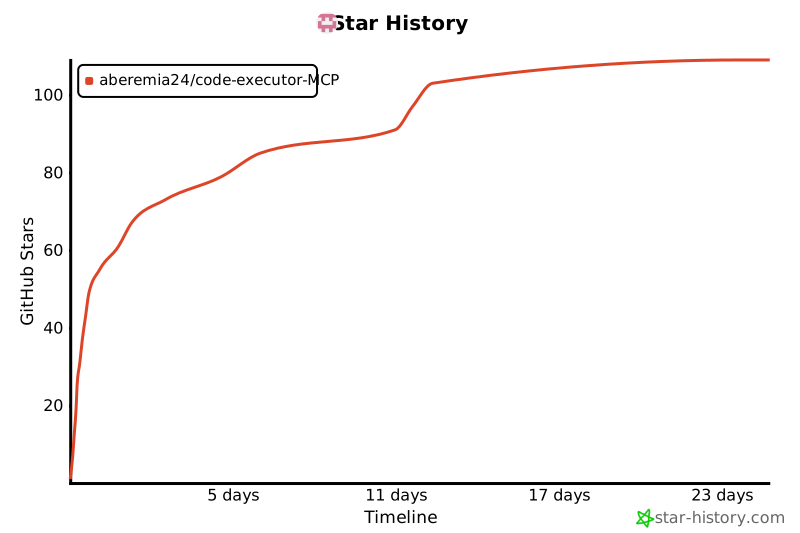
Star History
%20--%3e%3cdefs%3e%3cstyle%3e%20.st0%20{%20fill:%20%23061b40;%20}%20.st1%20{%20fill:%20%23306af1;%20}%20.st2%20{%20fill:%20%235ce5cf;%20}%20%3c/style%3e%3c/defs%3e%3cg%3e%3cpath%20class='st0'%20d='M55,10.5h9v3h-9v9h12V7.5h-12v3ZM64,19.5h-6v-3h6v3Z'/%3e%3cpolygon%20class='st0'%20points='69%2016.5%2078%2016.5%2078%2019.5%2069%2019.5%2069%2022.5%2081%2022.5%2081%2013.5%2072%2013.5%2072%2010.5%2081%2010.5%2081%207.5%2069%207.5%2069%2016.5'/%3e%3cpolygon%20class='st0'%20points='95%2010.5%2095%207.5%2083%207.5%2083%2022.5%2095%2022.5%2095%2019.5%2086%2019.5%2086%2016.5%2095%2016.5%2095%2013.5%2086%2013.5%2086%2010.5%2095%2010.5'/%3e%3cpath%20class='st0'%20d='M40,1.5v21h11.6l1.4-1.4v-7.6h0c0,0-1.4-1.5-1.4-1.5l1.4-1.4V2.9l-1.4-1.4h-11.6ZM50,19.5h-7v-6h7v6ZM50,10.5h-7v-6h7v6Z'/%3e%3c/g%3e%3cpath%20class='st1'%20d='M23.1,24L14.7,4.8l-4.9,11.2h3.8l-1.8,4H3.3L12.1,0H2C.9,0,0,.9,0,2v20c0,1.1.9,2,2,2h21.1Z'/%3e%3cpath%20class='st2'%20d='M34,0h-16.8l10.6,24h6.2c1.1,0,2-.9,2-2V2C36,.9,35.1,0,34,0ZM32.5,20h-4V4h4v16Z'/%3e%3c/svg%3e)
 Join Now


