🚀 MCP Speaker Diarization
An all-in-one complete package combining GPU-accelerated speaker diarization and recognition with web interface and REST API. Integrates pyannote.audio speaker diarization with faster-whisper transcription, designed for AI agent integration and hobby projects.


🚀 Quick Start
Prerequisites
-
Get a HuggingFace Token
-
Install NVIDIA Container Toolkit (for Docker deployment)
distribution=$(. /etc/os-release;echo $ID$VERSION_ID)
curl -s -L https://nvidia.github.io/nvidia-docker/gpgkey | sudo apt-key add -
curl -s -L https://nvidia.github.io/nvidia-docker/$distribution/nvidia-docker.list | sudo tee /etc/apt/sources.list.d/nvidia-docker.list
sudo apt-get update && sudo apt-get install -y nvidia-container-toolkit
sudo systemctl restart docker
Option 1: Docker Deployment (Recommended)
git clone <repository-url>
cd speaker-diarization-app
cp .env.example .env
docker-compose up --build
docker-compose up -d
docker-compose logs -f
Access the application:
- API Documentation: http://localhost:8000/docs
- API Endpoint: http://localhost:8000/api/v1
- MCP Server: http://localhost:8000/mcp
For a web interface, see the separate Next.js frontend repository.
Option 2: Local Development (Python venv)
sudo apt-get update
sudo apt-get install -y ffmpeg git portaudio19-dev
python -m venv venv
source venv/bin/activate
pip install -r requirements.txt
cp .env.example .env
./run_local.sh
First Run:
- Models will auto-download (~3 - 5GB).
- Startup may take 2 - 3 minutes for model loading.
- GPU memory will be allocated (check with
nvidia-smi).
✨ Features
- Persistent Speaker Recognition: Enroll speakers once, recognize them across all future recordings and conversations (not just "SPEAKER_00, SPEAKER_01" labels).
- Dual-Detector Emotion System: Combines general AI (emotion2vec+) with personalized voice profiles for dramatically improved emotion detection accuracy across 9 emotions (angry, happy, sad, neutral, fearful, surprised, disgusted, other, unknown).
- Personalized Learning: The system learns each speaker's unique emotional voice patterns from corrections with weighted embedding merging (no re-enrollment needed).
- Retroactive Intelligence: Identify one segment → all past segments with that voice automatically update.
- Transcription: faster-whisper 1.2.1 (configurable models: tiny/base/small/medium/large-v3, supports 99 languages, CTranslate2 backend).
- Live Streaming: Real-time recording with WebSocket streaming, VAD, and instant processing.
- AI-Ready Architecture: Built-in MCP server enables seamless integration with AI assistants (Claude Desktop, Flowise, custom agents) providing the contextual memory needed for natural multi-party conversations.
- REST API: Full programmatic access at
/api/v1/* (see /docs for interactive documentation).
- Backup/Restore: Export/import speaker profiles and voice settings.
- Production Ready: Handles thousands of conversations, batch processing, live streaming, MP3 conversion, and scales efficiently.
📦 Installation
Hardware
- GPU: NVIDIA GPU with CUDA 12.x support
- Tested on: NVIDIA RTX 3090 (24GB VRAM) - excellent performance
- VRAM Requirements (faster-whisper is very efficient):
- Diarization + embeddings: ~2 - 3GB base requirement
- Emotion detection: ~2GB (emotion2vec_plus_large)
- Whisper model adds (choose based on available VRAM):
tiny/base: ~400 - 500MB (total: ~5GB minimum with emotion)small: ~1GB (total: ~6GB recommended with emotion)medium: ~2GB (total: ~7GB recommended with emotion)large-v3: ~3 - 4GB (total: ~8 - 9GB recommended with emotion, default)
- Works on: Consumer GPUs (GTX 1060 6GB+, 1080, 2060, 3060, 3090, 4080, 4090, etc.)
- CPU Fallback: Runs on CPU but significantly slower (GPU strongly recommended)
- RAM: 8GB minimum, 16GB+ recommended
- Storage: ~10GB for models, plus space for audio recordings
Software
- Operating System: Linux (tested on Ubuntu), macOS (via Docker), Windows (via WSL2 + Docker)
- Python: 3.11 or 3.12
- CUDA: 12.4 (included in Docker image)
- cuDNN: 9.x (auto-installed)
- Docker (optional but recommended): 20.10+ with NVIDIA Container Toolkit
System Dependencies
- ffmpeg: Audio processing and format conversion
- git: HuggingFace model downloads
- portaudio19-dev: Live microphone recording (optional)
💻 Usage Examples
Basic Usage
import requests
with open("meeting.wav", "rb") as f:
response = requests.post(
"http://localhost:8000/api/v1/process",
files={"audio_file": f}
)
conversation = response.json()
for segment in conversation["segments"]:
print(f"{segment['speaker_name']}: {segment['text']}")
print(f" Emotion: {segment['emotion_category']} ({segment['emotion_confidence']})")
Advanced Usage
Assistant: "I heard multiple voices. Who were you speaking with?"
User: "That was my colleague Sarah"
📚 Documentation
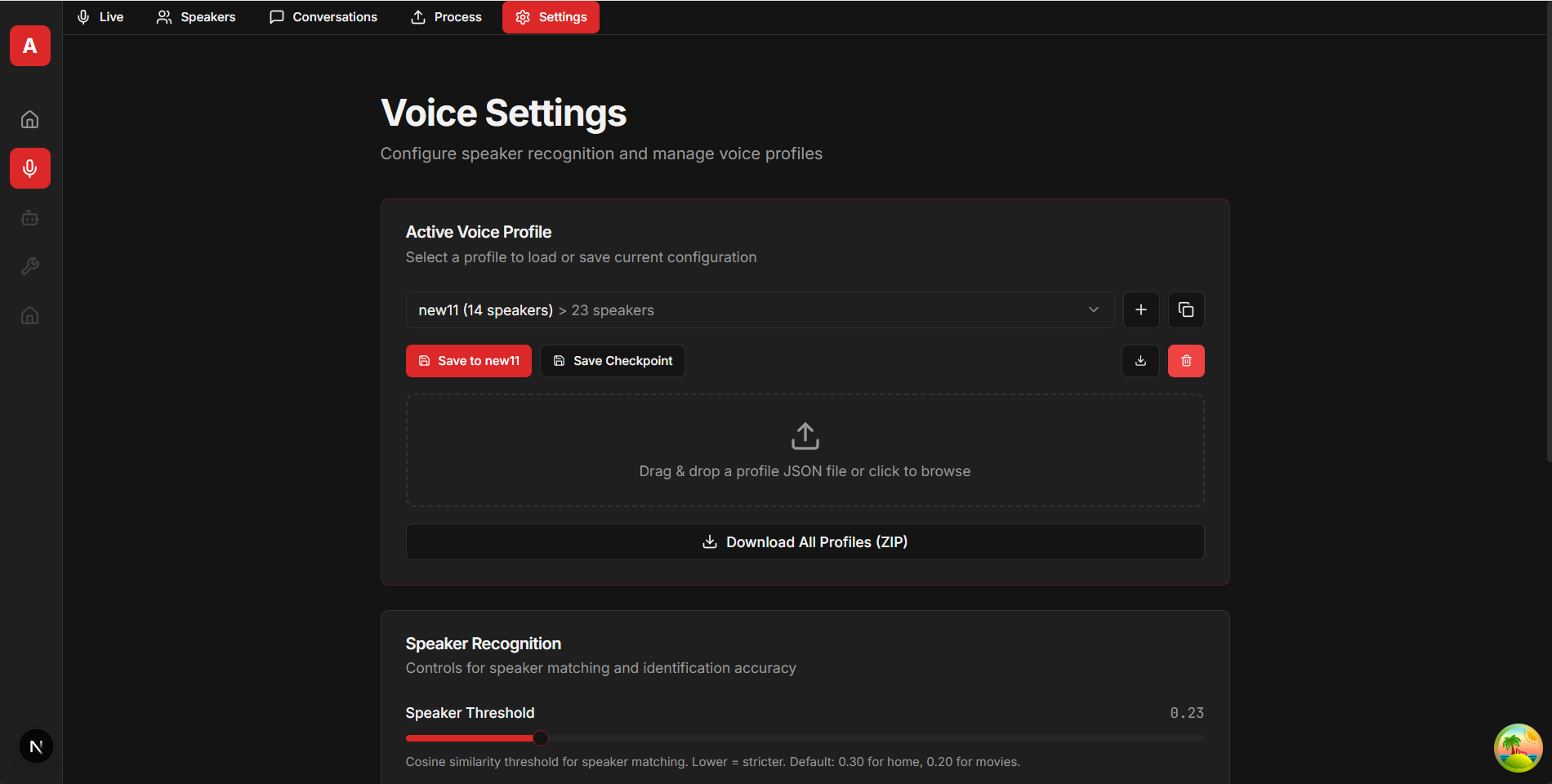
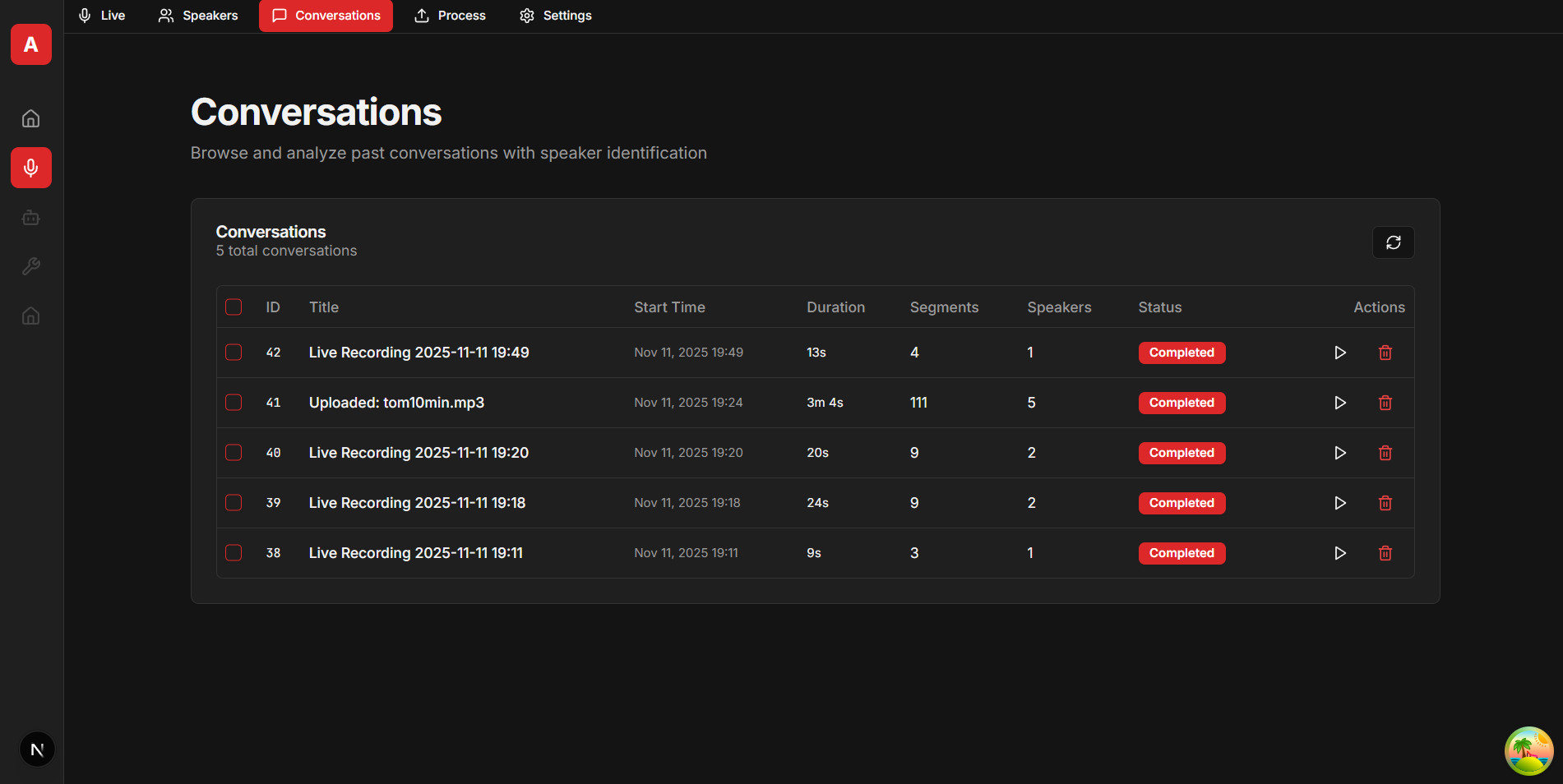
Screenshots
Example Next.js frontend interface (available at github.com/snailbrainx/speaker_identity_nextjs):
Use Cases
- AI Integration: Enable AI assistants to remember and distinguish multiple speakers across conversations.
- Meeting Transcription: Automatic labeling with emotion context.
- Research & Analysis: Multi-party conversation analysis with persistent identity.
- Customer Support: Separate agents from customers with emotion tracking.
Technical Stack
| Property |
Details |
| Diarization |
pyannote.audio 4.0.1 (pyannote/speaker-diarization-community-1) |
| Embeddings |
pyannote.audio (pyannote/embedding) |
| Emotion Recognition |
emotion2vec_plus_large via FunASR (ACL 2024, 9 emotion categories) |
| Transcription |
faster-whisper 1.2.1 (configurable models: tiny/base/small/medium/large-v3, supports 99 languages, CTranslate2 backend) |
| Backend API |
FastAPI 0.115.5 with WebSocket streaming support |
| ML Framework |
PyTorch 2.5.1 with CUDA 12.4 support |
| Database |
SQLAlchemy 2.0.36 with SQLite + Pydantic 2.11.0 |
| Audio Processing |
pydub, soundfile, ffmpeg |
| MCP Integration |
MCP 1.21.0 for AI agent connectivity |
Emotion Detection
Dual-detector system combining general AI with personalized voice profiles for dramatically improved accuracy.
How It Works
Two complementary detectors work together:
-
emotion2vec+ Detector (1024-D emotion embeddings)
- General emotion AI trained on large datasets.
- Works for all speakers (known/unknown).
- 9 categories: angry, happy, sad, neutral, fearful, surprised, disgusted, other, unknown.
-
Voice Profile Detector (512-D speaker embeddings)
- Learns each speaker's unique emotional voice patterns.
- Requires 3+ voice samples per emotion to activate.
- Checks general + all emotion-specific profiles (Andy, Andy_angry, Andy_happy, etc.).
Best match wins: If Andy_angry voice profile matches at 92% vs emotion2vec's 78% neutral, the voice detector wins.
Threshold Configuration
Environment Variables:
EMOTION_THRESHOLD=0.6 - Emotion matching sensitivity (0.3 - 0.9, higher = stricter).SPEAKER_THRESHOLD=0.30 - Voice matching sensitivity (0.20 - 0.35, higher = stricter).
Both thresholds can be customized per-speaker or per-emotion via the API for fine-grained control.
Personalized Learning
Correct any segment's emotion → the system learns automatically:
- Stores an emotion embedding (1024-D) for emotion2vec matching.
- Stores a voice embedding (512-D) for voice profile matching.
- Merges using weighted averaging (older samples have more weight).
- Updates the general speaker profile too.
- After 3+ corrections per emotion → the voice detector activates.
Manual correction = 100% confidence. No need to re-identify the speaker.
Performance
- Speed: ~37ms per segment (+5ms for voice matching).
- VRAM: ~2GB emotion2vec + ~1GB speaker embeddings (shared).
- Activation: 3+ voice samples required per emotion.
Remote Access
If you're running the application on a remote server (e.g., a headless Ubuntu server with GPU), you can access the web interface via SSH port forwarding.
SSH Tunnel (Windows)
Using PowerShell or Command Prompt:
ssh -L 8000:localhost:8000 username@remote-server-ip
Using PuTTY:
- Open PuTTY and enter your server hostname/IP.
- Navigate to: Connection → SSH → Tunnels.
- Add a forwarding rule:
- Source port:
8000.
- Destination:
localhost:8000.
- Click "Add".
- Return to the Session tab and connect.
After connecting:
- Open a browser on your Windows machine.
- Navigate to:
http://localhost:8000/docs (API documentation).
SSH Tunnel (Linux/Mac)
ssh -L 8000:localhost:8000 username@remote-server-ip
Then access the API docs at http://localhost:8000/docs.
Configuration
All settings are configured via environment variables in the .env file:
Required
HF_TOKEN=your_huggingface_token_here
Optional (with optimized defaults)
DATABASE_URL=sqlite:////app/volumes/speakers.db
SPEAKER_THRESHOLD=0.30
CONTEXT_PADDING=0.15
SILENCE_DURATION=0.5
FILTER_HALLUCINATIONS=true
EMOTION_THRESHOLD=0.6
WHISPER_MODEL=large-v3
WHISPER_LANGUAGE=en
Recommended Settings
Default settings are optimized for normal home usage:
- SPEAKER_THRESHOLD = 0.30: Good balance of accuracy and matching for home conversations.
- CONTEXT_PADDING = 0.15: Optimal for audio with background noise/music.
- SILENCE_DURATION = 0.5: Balances responsiveness with complete sentence capture.
- WHISPER_MODEL = large-v3: Best accuracy, requires ~3 - 4GB VRAM. Use
small (~1GB) or base (~500MB) for weaker GPUs.
- WHISPER_LANGUAGE = en: English only (fastest). Use
auto for multilingual auto-detection or specify a language code.
For stricter matching with movie audio or challenging conditions, reduce SPEAKER_THRESHOLD to 0.20.
How It Works
Architecture Overview
┌──────────────────────────────────────────────────────────────────┐
│ User Input │
│ (Upload Audio / Live Recording) │
└──────────────────┬───────────────────────────────────────┘
│
▼
┌───────────────────────┐
│ Audio Format │
│ Conversion │
│ (if needed) │
│ │
│ MP3/M4A → WAV │
│ Live: 48kHz chunks │
└───────────┬───────────┘
│
╔══════════════╧════════════════╗
║ PARALLEL PROCESSING ║ ← ~50% faster!
║ ThreadPoolExecutor ║ Both run
║ (2 workers) ║ simultaneously
╚══════════════╤════════════════╝
│
┌─────────────────┴─────────────────┐
│ │
▼ ▼
┌────────────────────┐ ┌───────────────────────┐
│ Transcription │ │ Diarization │
│ (faster-whisper) │ │ (pyannote.audio) │
│ │ │ │
│ "What was said" │ │ "Who spoke when" │
│ │ │ │
│ • Speech → Text │ │ • Detect speaker │
│ • Word timestamps │ │ turns │
│ • Confidence │ │ • Assign labels │
│ scores │ │ (SPEAKER_00, etc.) │
│ • VAD filtering │ │ • Time boundaries │
│ │ │ │
│ ~40 - 100ms │ │ ~40 - 100ms │
│ (live segments) │ │ (live segments) │
└─────────┬──────────┘ └───────────┬───────────┘
│ │
└──────────────┬───────────────────┘
│
▼
┌───────────────────────┐
│ Segment Alignment │
│ │
│ Match transcription │
│ to speaker labels │
│ by timestamp overlap │
└───────────┬───────────┘
│
┌───────────────┴───────────────┐
│ │
▼ ▼
┌────────────────────┐ ┌────────────────────────┐
│ Embedding │ │ Speaker Matching │
│ Extraction │ │ (Cosine Similarity) │
│ (pyannote) │ │ │
│ │ │ Compare embeddings │
│ • Extract voice │──────→ to known speakers │
│ signature │ │ │
│ • 512-D vectors │ │ Threshold: 0.20 - 0.30 │
│ • Context padding │ │ │
│ (0.15s) │ │ Match or Unknown? │
│ • Skip if <0.5s │ │ │
└────────────────────┘ └───────────┬────────────┘
│
┌──────────────┴──────────────┐
│ │
▼ ▼
┌─────────────────┐ ┌──────────────────┐
│ Known Speaker │ │ Unknown Speaker │
│ "Alice" │ │ "Unknown_01" │
│ │ │ │
│ • Has ID │ │ • No ID yet │
│ • Confidence │ │ • Auto-enrolled │
│ score │ │ • Embedding │
│ │ │ stored │
└────────┬────────┘ └────────┬─────────┘
│ │
└──────────┬────────────────┘
│
▼
┌───────────────────────┐
│ EMOTION DETECTION │
│ (Sequential) │
│ │
│ "How they felt" │
└───────────┬───────────┘
│
┌───────────▼───────────┐
│ Step 1: Speaker │
│ Matching │
│ │
│ • Extract 512-D │
│ voice embedding │
│ • Check ALL profiles:│
│ - Andy (general) │
│ - Andy_angry │
│ - Andy_happy │
│ (if ≥3 samples) │
│ │
│ Returns: │
│ • speaker_name │
│ • matched_emotion │
│ (or None) │
└───────────┬───────────┘
│
┌───────────▼───────────┐
│ Step 2: emotion2vec+ │
│ (ALWAYS RUNS) │
│ │
│ • Extract 1024-D │
│ emotion embedding │
│ • 9 categories │
│ │
│ Returns: │
│ • emotion: "neutral" │
│ • confidence: 0.78 │
│ │
│ ~30ms per segment │
└───────────┬───────────┘
│
┌───────────▼───────────┐
│ Decision: Did Step 1 │
│ find emotion profile?│
└───────┬───────────────┘
│
┌─────────┴─────────┐
YES │ │ NO
▼ ▼
┌────────────────────┐ ┌──────────────────┐
│ FAST PATH │ │ Check profiles? │
│ Override emotion │ │ │
│ │ │ If has profiles │
│ Use Step 1 result │ │ (≥3 samples): │
│ emotion = "angry" │ │ │
│ conf = 0.92 │ │ → Dual-detector │
│ │ │ comparison │
│ Skip comparison │ │ │
│ │ │ Else: │
│ ~0ms (instant) │ │ → Use emotion2vec│
└────────┬───────────┘ └────────┬─────────┘
│ │
│ ┌────────────▼────────────┐
│ │ SLOW PATH: │
│ │ Dual-Detector Compare │
│ │ │
│ │ • emotion2vec match │
│ │ (1024-D) │
│ │ • Voice profile match │
│ │ (512-D, ≥3 samples) │
│ │ │
│ │ Rules: │
│ │ 1. Both agree → Avg │
│ │ 2. neutral → Trust it │
│ │ 3. Voice >85% → Voice │
│ │ 4. Disagree → neutral │
│ │ 5. Else → emotion2vec │
│ │ │
│ │ ~5ms additional │
│ └────────┬────────────────┘
│ │
└───────────────────┘
│
┌──────────────▼─────────────┐
│ Final Emotion │
│ │
│ With detector_breakdown: │
│ • emotion2vec result │
│ • voice profile result │
│ • final decision + reason │
└────────────────────────────┘
│
▼
┌───────────────────────┐
│ Database Storage │
│ │
│ ConversationSegment: │
│ • text │
│ • speaker_name │
│ • speaker_id │
│ • confidence │
│ • emotion_category │
│ • emotion_confidence │
│ • emotion_corrected │
│ • emotion_misidentified│
│ • start/end times │
│ • word-level data │
└───────────┬───────────┘
│
┌───────────────┴───────────────┐
│ │
▼ ▼
┌──────────────────┐ ┌──────────────────────┐
│ Auto-Clustering │ │ User Identifies │
│ │ │ Unknown Speaker │
│ Group similar │ │ │
│ Unknown speakers│ │ "Unknown_01 is Bob" │
│ by embedding │ │ │
│ similarity │ │ → Embedding Merging │
└──────────────────┘ │ → Retroactive │
│ Updates (all │
│ past segments) │
└──────────────────────┘
│
▼
┌──────────────────────┐
│ User Corrects │
│ Emotion │
│ │
│ "Actually angry, │
│ not neutral" │
│ │
│ → Extract & store: │
│ • 1024-D emotion │
│ embedding │
│ • 512-D voice │
│ embedding │
│ → Merge into │
│ SpeakerEmotion │
│ Profile (weighted│
│ averaging) │
│ → Updates: │
│ • Andy_angry │
│ (emotion profile)│
│ • General Andy │
│ (speaker profile)│
│ → If changing │
│ emotion: recalc │
│ OLD profile too │
│ → Confidence = 100% │
│ (manual confirm) │
│ → After 3+ samples: │
│ voice detector │
│ activates! │
└──────────────────────┘
Key Points:
- Parallel Processing: Transcription (Whisper) and Diarization (Pyannote) run simultaneously using ThreadPoolExecutor, achieving ~50% speedup.
- Processing Speed (per segment on GPU):
- Transcription + Diarization: ~40 - 100ms (parallel).
- Alignment + Voice Embedding Extraction: ~20 - 40ms.
- Speaker Matching (checks all profiles including emotion-specific): ~0.5ms.
- emotion2vec+ Extraction (ALWAYS runs): ~30ms.
- Decision Path:
- Fast path override (if emotion profile matched): ~0ms instant.
- Dual-detector comparison (if profiles exist): ~5ms additional.
- Fallback to emotion2vec only: ~0ms (already extracted).
- Audio Conversion: Automatic format conversion (MP3 → WAV) before processing; live recording saves 48kHz chunks.
- Sequential Operations: Alignment → Voice Embedding Extraction (512-D) → Speaker Matching → emotion2vec Extraction (1024-D) → Decision (override or dual-detector or fallback).
- Emotion Detection Flow:
- Speaker matching checks ALL profiles (general + emotion-specific like Andy_angry).
- emotion2vec ALWAYS extracts emotion (runs for every segment).
- IF the speaker matched an emotion profile → Override emotion2vec (fast path).
- ELSE IF the speaker has learned profiles (≥3 samples) → Dual-detector comparison (5 decision rules).
- ELSE → Use the emotion2vec result only.
- Dual-Detector System: Stores BOTH 1024-D emotion embeddings (emotion2vec) AND 512-D voice embeddings (speaker recognition) per emotion; the voice profile detector requires ≥3 samples to activate.
- Personalized Learning: User corrections extract and store BOTH embedding types, merge using weighted averaging; changing emotions recalculates BOTH old and new profiles; confidence is set to 100% after manual correction.
- Why Sequential?: The bottleneck (transcription + diarization) is parallelized. Post-processing (~35ms total) is fast enough that further parallelization adds complexity without meaningful speedup.
- Sample Rates: Browser (48kHz) → Whisper/Pyannote (auto-resample) → Emotion2vec (16kHz) → Storage (WAV 48kHz for streaming, MP3 192k for uploads).
Processing Pipeline
- Audio Input
- Upload: MP3/WAV files are automatically converted and saved to
data/recordings/.
- Live: Browser microphone → streaming chunks are saved to
data/stream_segments/.
- Parallel Processing (faster than sequential)
- Diarization (pyannote): Detects speaker turns, outputs segments with anonymous labels (SPEAKER_00, SPEAKER_01, etc.).
- Transcription (Whisper): Converts speech to text with timestamps.
- Both run simultaneously using ThreadPoolExecutor.
- Segment Alignment
- Match transcription segments to speaker labels by timestamp overlap.
- Uses the segment midpoint for matching:
(start + end) / 2.
- Falls back to the closest segment if there is no exact overlap.
- Embedding Extraction
- For each segment, extract a 512-dimensional voice signature using the pyannote embedding model.
- Context padding (0.15s) is added before/after for robustness with background noise.
- Minimum segment duration: 0.5 seconds.
- Speaker Matching
- Compare the segment embedding to known speaker embeddings.
- Cosine similarity calculation (0.0 - 1.0).
- If similarity > threshold (default 0.30): Identified as a known speaker.
- If similarity ≤ threshold: Labeled as "Unknown_XX".
- Unknown Speaker Handling
- Embedding verification: Check if multiple Unknown segments are the same person.
- Group similar unknowns (same threshold).
- Each unique voice gets a unique Unknown_XX identifier.
- Embeddings are stored for future auto-enrollment.
- Auto-Enrollment (when the user identifies an unknown)
- The user provides a speaker name for any segment.
- If it's a new name: Creates a speaker profile automatically.
- Embedding merging: Averages embeddings from all segments of the same speaker.
- Retroactive updates: All past segments with the same Unknown label get updated.
- Continuous improvement: Each identification strengthens the speaker profile.
Voice Activity Detection (VAD)
Two independent VAD systems work together:
- Live Recording VAD (energy-based)
- Calculates RMS energy:
sqrt(mean(audio^2)).
- Threshold: 0.005 (configurable).
- Detects speech vs. silence in real-time.
- Shows a live indicator in the UI: "🟢 Speech Detected" or "⚪ Idle".
- After X seconds of silence (default 0.5s), triggers segment processing.
- Transcription VAD (Whisper's built-in)
- Uses the Silero VAD model.
- Filters non-speech before transcription.
- Reduces hallucinations ("thank you.", "thanks for watching").
- Enabled via the
vad_filter = True parameter.
Misidentification Correction
- Mark as Misidentified: Exclude a segment from embedding calculations.
- Reassign to Correct Speaker: Updates both speakers' embeddings.
- Automatic Recalculation: Averages embeddings from all non-misidentified segments.
- Prevents Embedding Corruption: Ensures speaker profiles remain accurate.
REST API & MCP Server
API Overview
Base URL: http://localhost:8000/api/v1
Interactive Docs: http://localhost:8000/docs (Swagger UI with test interface)
Key Endpoints:
- System
GET /status - Health check, GPU status, system stats.
- Settings
GET/POST /settings/voice - Runtime configuration (thresholds, padding, filtering).POST /settings/voice/reset - Reset to defaults.
- Speakers
GET /speakers - List all enrolled speakers with segment counts.POST /speakers/enroll - Enroll a new speaker with an audio sample.PATCH /speakers/{id}/rename - Rename a speaker (auto-updates all past segments).DELETE /speakers/{id} - Delete a speaker profile.DELETE /speakers/unknown/all - Delete all Unknown_* speakers.
- Emotion Profiles
GET /speakers/{id}/emotion-profiles - View learned emotion profiles.DELETE /speakers/{id}/emotion-profiles - Reset emotion profiles.GET/PATCH /speakers/{id}/emotion-threshold - Per-speaker emotion threshold.PATCH /speakers/{id}/emotion-profiles/{emotion}/threshold - Per-emotion threshold.
- Conversations
GET /conversations - List all conversations (paginated).GET /conversations/{id} - Get the full transcript with all segments.PATCH /conversations/{id} - Update conversation metadata.DELETE /conversations/{id} - Delete a conversation and its audio.POST /conversations/{id}/reprocess - Re-run diarization with current speakers.POST /conversations/{id}/recalculate-emotions - Recalculate emotions for all segments.POST /process - Upload and process an audio file.
- Segments
POST /conversations/{id}/segments/{seg_id}/identify - Identify a speaker (auto-updates all past).POST /conversations/{id}/segments/{seg_id}/correct-emotion - Correct and learn an emotion.PATCH /conversations/{id}/segments/{seg_id}/misidentified - Mark a speaker as misidentified.PATCH /conversations/{id}/segments/{seg_id}/emotion-misidentified - Mark an emotion as wrong.GET /conversations/segments/{seg_id}/audio - Download segment audio.
- Streaming
WS /streaming/ws - WebSocket for live recording.
- Backup/Restore
POST /profiles - Create a new backup profile.GET /profiles - List all backup profiles.GET /profiles/{name} - Get specific profile details.PATCH /profiles/{name} - Save the current state to a profile.DELETE /profiles/{name} - Delete a backup profile.POST /profiles/{name}/checkpoints - Create a checkpoint.POST /profiles/restore - Restore from a backup.GET /profiles/download/{name} - Download a backup JSON.POST /profiles/import - Import a backup JSON.
📖 Full documentation with examples: http://localhost:8000/docs
MCP Server Integration
Model Context Protocol (MCP) enables AI assistants to directly interact with the speaker diarization system.
MCP Endpoint: http://localhost:8000/mcp
Protocol: JSON - RPC 2.0 over HTTP with Server - Sent Events
Compatible With: Claude Desktop, Flowise, custom MCP clients
Available MCP Tools (11):
list_conversations - Get conversation IDs and metadata.get_conversation - Get the full transcript with speaker labels.get_latest_segments - Get recent segments across conversations.identify_speaker_in_segment - Label an unknown speaker (auto-updates all past segments).rename_speaker - Rename an existing speaker (auto-updates all past segments).list_speakers - Get all enrolled speaker profiles.delete_speaker - Remove a speaker profile.delete_all_unknown_speakers - Cleanup Unknown_* speakers.update_conversation_title - Set a conversation title.reprocess_conversation - Re-run recognition with updated speaker profiles.search_conversations_by_speaker - Find all conversations where a specific speaker appears.
Key Features:
- Automatic Retroactive Updates: Identifying/renaming a speaker updates ALL past segments automatically.
- No Reprocessing Needed: The system maintains speaker identity across sessions.
- Auto-Enrollment: Can create speaker profiles from any segment.
- Conversation Context: AI can retrieve the full "who said what" history.
Example MCP Client Configuration (Flowise/Claude Desktop):
{
  "mcpServers": {
    "speaker-diarization": {
      "url": "http://localhost:8000/mcp",
      "transport": "http"
    }
  }
}
Usage Example:
Assistant: "I heard multiple voices. Who were you speaking with?"
User: "That was my colleague Sarah"
AI Assistant Integration Examples
Integration Approaches
- Option 1: REST API (Full Control)
- Your app manages audio recording and streaming.
- POST audio to
/api/v1/process or use the WebSocket /streaming/ws.
- Receive segments with speaker labels and emotions.
- Query conversation history via
/conversations endpoints.
- Option 2: MCP Server (AI-Native)
- Connect Claude Desktop, Flowise, or custom MCP clients.
- The AI assistant directly calls 10 MCP tools for speaker management.
- Automatic retroactive updates when identifying/renaming speakers.
- Zero code - just configure the MCP endpoint.
Example Workflow
- Scenario: An AI assistant having a multi-party conversation.
- Unknown speaker detected
User: "Alright mate, how are you doing?"
Unknown: "Good mate, you?"

AI: "Who are you speaking to?"
User: "That's Nick"
- AI identifies the speaker via MCP
identify_speaker_in_segment(
segment_id=145,
speaker_name="Nick",
auto_enroll=true
)
- The system auto-updates all past segments
- Creates Nick's voice profile.
- Updates ALL previous Unknown segments with Nick's voice.
- Future recordings recognize Nick automatically.
- AI remembers Nick in future conversations
Nick: "Hey, remember what we discussed yesterday?"
AI: "Yes Nick, you mentioned the project deadline..."
Advanced Features
Embedding Merging
When identifying unknown speakers or re-identifying existing speakers:
- Never replaces embeddings (would lose historical data).
- Always merges using averaging:
(existing_embedding + new_embedding) / 2.
- Continuous improvement: Each recording strengthens the speaker profile.
- Handles variability: Averages across different audio conditions, emotions, etc.
Retroactive Identification
Rename any speaker → all past segments automatically update:
curl -X POST "http://localhost:8000/api/v1/conversations/5/segments/123/identify?speaker_name=Alice&enroll=true"
Backup & Restore
Export and restore speaker profiles:
- Backup:
- Exports all speakers and their embeddings to JSON.
- Includes segment assignments for full state recovery.
- Saves to
backups/backup_YYYYMMDD_HHMMSS.json.
- Does NOT include audio files (only speaker data).
- Restore:
- Reconstructs the speaker database from a backup.
- Restores embeddings and segment assignments.
- Useful for testing different configurations.
- Useful for migrating between deployments.
Ground Truth Labeling
Test and optimize recognition accuracy:
- Manually label segments with true speaker identities.
- Labels are stored separately (doesn't affect actual segments).
- Run tests comparing predictions vs. labels.
- Optimize threshold and padding parameters.
- Current optimal settings are derived from this testing.
Data Persistence
Directory Structure
speaker-diarization-app/
├── data/
│   ├── recordings/              # Permanent audio storage
│   │   ├── conv_7_full.mp3     # Live recordings (MP3)
│   │   ├── uploaded_1_tommy_converted.wav  # Uploads
│   │   └── 20251109_160230_meeting.wav    # Timestamped uploads
│   │
│   ├── stream_segments/         # Live recording segments (temporary)
│   │   └── conv_7/
│   │       ├── seg_0001.wav
│   │       ├── seg_0002.wav
│   │       └── ...
│   │
│   └── temp/                    # Temporary segment extractions
│       └── segment_123_456.wav
│
├── volumes/
│   ├── speakers.db              # SQLite database
│   └── huggingface_cache/       # Downloaded models
│
├── backups/                     # Backup snapshots (JSON)
│   └── backup_20251109_120000.json
│
├── scripts/                     # Utility scripts
│   ├── migrate_temp_audio.py   # Fix audio paths
│   ├── diagnose_speakers.py    # Debug issues
│   └── ...
│
└── tests/                       # Test files
    └── test_*.py
Docker Volumes
All data persists via volume mounts in docker-compose.yml:
volumes:
- ./volumes:/app/volumes
- ./data:/app/data
- ./backups:/app/backups
What Persists:
- ✅ Speaker profiles and embeddings.
- ✅ All conversations and segments.
- ✅ Audio recordings.
- ✅ Downloaded models (~3 - 5GB).
- ✅ Backup snapshots.
What Doesn't Persist:
- ❌ Container state (rebuild-safe).
- ❌ Logs (use
docker-compose logs -f to monitor).
Troubleshooting
Installation Issues
- "HuggingFace token not found"
- Ensure
HF_TOKEN is set in the .env file.
- Accept the model terms at HuggingFace (links in Prerequisites).
- Check that the token has no extra spaces/quotes.
- "Unable to load libcudnn_cnn.so.9"
- Standalone:
run_local.sh sets LD_LIBRARY_PATH automatically.
- Docker: The Dockerfile installs cuDNN via pip.
- Manual:
pip install nvidia-cudnn-cu12==9.* nvidia-cublas-cu12.
- Permission errors
sudo chown -R $USER:docker data/ volumes/ backups/
docker run --rm --gpus all nvidia/cuda:12.4.0-base-ubuntu22.04 nvidia-smi
Processing Issues
- "CUDA out of memory"
- Close other GPU applications.
- Process shorter audio segments.
- Enable transcription selectively (disable for diarization-only).
- Fallback: Run on CPU (set
CUDA_VISIBLE_DEVICES="" - very slow).
- Speaker not recognized
- Enrollment audio should be at least 10 - 30 seconds.
- Use clear audio with minimal background noise.
- Check the threshold: Lower = more strict (try the 0.20 - 0.35 range, default 0.30).
- Re-enroll with better quality audio.
- "Audio file not found" errors
- Old uploads: Run
python scripts/migrate_temp_audio.py.
- New uploads: Should auto-save to
data/recordings/.
- Verify that the
data/ directory is accessible.
- Whisper hallucinations ("thank you.", "thanks for watching")
- Already filtered via energy thresholding and text filtering.
- Set
FILTER_HALLUCINATIONS=true in the .env file.
- Ensure
vad_filter = true in transcription (default).
Performance Issues
- Slow processing
- Verify that the GPU is in use: Check
nvidia-smi during processing.
- Docker: Ensure
runtime: nvidia in docker-compose.yml.
- Check if CUDA is available:
python -c "import torch; print(torch.cuda.is_available())".
- First run: Models download (~3 - 5GB), subsequent runs are much faster.
- High memory usage
- Normal: Models load ~4 - 6GB VRAM.
- Transcription adds ~2 - 3GB.
- Multiple simultaneous processes multiply memory usage.
- Reduce the batch size or process sequentially.
Audio Issues
- No audio playback in the UI
- Check if audio files exist:
ls data/recordings/.
- Verify that the API endpoint returns audio:
/api/v1/conversations/segments/{id}/audio.
- Check the browser console for errors.
- Try a different browser (tested: Chrome, Firefox, Safari).
- Live recording not working
- Browser permission: Allow microphone access.
- Standalone: Install PortAudio:
sudo apt-get install portaudio19-dev.
- Check browser microphone settings.
- Try a different browser.
🔧 Technical Details
- Parallel Processing: Transcription (Whisper) and Diarization (Pyannote) run simultaneously using ThreadPoolExecutor, achieving ~50% speedup.
- Processing Speed (per segment on GPU):
- Transcription + Diarization: ~40 - 100ms (parallel).
- Alignment + Voice Embedding Extraction: ~20 - 40ms.
- Speaker Matching (checks all profiles including emotion-specific): ~0.5ms.
- emotion2vec+ Extraction (ALWAYS runs): ~30ms.
- Decision Path:
- Fast path override (if emotion profile matched): ~0ms instant.
- Dual-detector comparison (if profiles exist): ~5ms additional.
- Fallback to emotion2vec only: ~0ms (already extracted).
- Audio Conversion: Automatic format conversion (MP3 → WAV) before processing; live recording saves 48kHz chunks.
- Sequential Operations: Alignment → Voice Embedding Extraction (512-D) → Speaker Matching → emotion2vec Extraction (1024-D) → Decision (override or dual-detector or fallback).
- Emotion Detection Flow:
- Speaker matching checks ALL profiles (general + emotion-specific like Andy_angry).
- emotion2vec ALWAYS extracts emotion (runs for every segment).
- IF the speaker matched an emotion profile → Override emotion2vec (fast path).
- ELSE IF the speaker has learned profiles (≥3 samples) → Dual-detector comparison (5 decision rules).
- ELSE → Use the emotion2vec result only.
- Dual-Detector System: Stores BOTH 1024-D emotion embeddings (emotion2vec) AND 512-D voice embeddings (speaker recognition) per emotion; the voice profile detector requires ≥3 samples to activate.
- Personalized Learning: User corrections extract and store BOTH embedding types, merge using weighted averaging; changing emotions recalculates BOTH old and new profiles; confidence is set to 100% after manual correction.
- Why Sequential?: The bottleneck (transcription + diarization) is parallelized. Post-processing (~35ms total) is fast enough that further parallelization adds complexity without meaningful speedup.
- Sample Rates: Browser (48kHz) → Whisper/Pyannote (auto-resample) → Emotion2vec (16kHz) → Storage (WAV 48kHz for streaming, MP3 192k for uploads).
📄 License
This project is licensed under the MIT License - see the LICENSE file for details.
Dependency Licenses
All major dependencies use permissive open-source licenses compatible with MIT:
- pyannote.audio (4.0.1): MIT License
- Models require a HuggingFace token and terms acceptance.
- The models themselves remain open-source and MIT licensed.
- faster-whisper (1.2.1): MIT License (SYSTRAN)
- FastAPI (0.115.5): MIT License
- Next.js (15.x): MIT License
- PyTorch (2.5.1): BSD 3 - Clause License
- SQLAlchemy (2.0.36): MIT License
- Pydantic (2.11.0): MIT License
- MCP (1.21.0): MIT License
Note: While the software licenses are permissive, pyannote's pretrained models require:
- A HuggingFace account.
- An access token.
- Acceptance of the model terms of use.
This is an authentication requirement, not a licensing restriction. The models remain open-source.
Credits
This project builds upon exceptional open-source work:
- pyannote.audio by Hervé Bredin - State-of-the-art speaker diarization and embedding models.
- faster-whisper by SYSTRAN - Optimized Whisper implementation using CTranslate2.
- OpenAI Whisper - The original speech recognition model.
- FastAPI by Sebastián Ramírez - A modern web framework.
Thank you to these projects and their contributors for making this application possible.
Planned Features
Automatic Conversation Summarization and Titling
- AI-powered conversation summarization when recording finishes.
- Automatic title generation based on conversation content.
- Triggers when the current conversation ends and a new one begins.
- Replaces generic "Conversation 15" with meaningful titles like "Discussion about project deadline with Nick".
- Helps with conversation discovery and context retrieval.
Vector Database Search for Transcriptions
- Store transcription text in a vector database for semantic search.
- Query conversations by topic or content, not just speaker.
- Each vector entry references a conversation ID for easy retrieval.
- Enables long-term memory and contextual conversation lookup.
- Use cases:
- "What did we discuss about the budget last month?"
- "Find conversations where we talked about product features"
- "Show me all discussions related to the new project"
Contributing
Contributions are welcome! Please feel free to submit a Pull Request.
Areas for contribution:
- Additional language support (currently English-only).
- Performance optimizations.
- UI/UX improvements.
- Documentation improvements.
Disclaimer
This software is provided "as-is" without warranty of any kind. The developers make no guarantees about the accuracy of speaker identification or transcription. While we've implemented best practices and extensive testing, speaker recognition is inherently probabilistic and may produce errors.
Use responsibly:
- Verify important identifications manually.
- Test thoroughly in your environment.
- Respect privacy and obtain consent before recording.
- This is a tool to assist, not replace, human judgment.
Some portions of this codebase were developed collaboratively with Claude Code (AI pair programming assistant). While thoroughly tested, we recommend reviewing the code before deploying in critical applications.
Questions or issues? Open an issue on GitHub or check existing issues for solutions.
Want to use this with AI agents? See the API Reference section for MCP integration guidance.
%20--%3e%3cdefs%3e%3cstyle%3e%20.st0%20{%20fill:%20%23061b40;%20}%20.st1%20{%20fill:%20%23306af1;%20}%20.st2%20{%20fill:%20%235ce5cf;%20}%20%3c/style%3e%3c/defs%3e%3cg%3e%3cpath%20class='st0'%20d='M55,10.5h9v3h-9v9h12V7.5h-12v3ZM64,19.5h-6v-3h6v3Z'/%3e%3cpolygon%20class='st0'%20points='69%2016.5%2078%2016.5%2078%2019.5%2069%2019.5%2069%2022.5%2081%2022.5%2081%2013.5%2072%2013.5%2072%2010.5%2081%2010.5%2081%207.5%2069%207.5%2069%2016.5'/%3e%3cpolygon%20class='st0'%20points='95%2010.5%2095%207.5%2083%207.5%2083%2022.5%2095%2022.5%2095%2019.5%2086%2019.5%2086%2016.5%2095%2016.5%2095%2013.5%2086%2013.5%2086%2010.5%2095%2010.5'/%3e%3cpath%20class='st0'%20d='M40,1.5v21h11.6l1.4-1.4v-7.6h0c0,0-1.4-1.5-1.4-1.5l1.4-1.4V2.9l-1.4-1.4h-11.6ZM50,19.5h-7v-6h7v6ZM50,10.5h-7v-6h7v6Z'/%3e%3c/g%3e%3cpath%20class='st1'%20d='M23.1,24L14.7,4.8l-4.9,11.2h3.8l-1.8,4H3.3L12.1,0H2C.9,0,0,.9,0,2v20c0,1.1.9,2,2,2h21.1Z'/%3e%3cpath%20class='st2'%20d='M34,0h-16.8l10.6,24h6.2c1.1,0,2-.9,2-2V2C36,.9,35.1,0,34,0ZM32.5,20h-4V4h4v16Z'/%3e%3c/svg%3e)
 Join Now
%20--%3e%3cdefs%3e%3cstyle%3e%20.st0%20{%20fill:%20%230080ff;%20}%20%3c/style%3e%3c/defs%3e%3cpath%20class='st0'%20d='M16.2,11.1c.4.5.4,1.2,0,1.8l-4.7,7.1h-3.8l5.3-8L7.6,4h3.8l4.7,7.1Z'/%3e%3c/svg%3e)