📺 Push To Display CLI
Command-line interface and MCP server for Push To Display — send real-time updates to display boards from your terminal or AI agents.
🚀 Quick Start
📦 Installation
Run directly with npx (no install needed):
npx pushtodisplay --help
Or install globally:
npm install -g pushtodisplay
📋 Requirements
⚡ First Commands
pushtodisplay auth login
pushtodisplay send "Hello, Display!"
pushtodisplay send -b <board-id> "Deploy completed"
pushtodisplay boards list
🔐 Authentication
Log in with your Push To Display account — the same account you use in the mobile app.
🌐 Browser Login (Default)
pushtodisplay auth login
Opens your browser. Sign in and the CLI receives your credentials automatically.
🖥️ Device Code Login (Headless)
For machines without a browser — SSH sessions, containers, or remote servers:
pushtodisplay auth login --device-code
The CLI prints a URL and a one-time code. Open the URL on any device, enter the code, and approve the login.
💾 Credential Storage
Credentials are stored in your OS keychain:
| Platform |
Storage Backend |
| macOS |
Keychain |
| Linux |
libsecret |
| Windows |
Credential Manager |
Falls back to ~/.config/pushtodisplay/ if the keychain is unavailable.
pushtodisplay auth status
pushtodisplay auth logout
⌨️ Commands
send
Send a display update to a board.
pushtodisplay send -b my-board-id "Deploy succeeded"
pushtodisplay send -b my-board-id "Status" --size large --weight bold --color "#00FF00"
pushtodisplay send -b my-board-id "Build:" "passing" --color "#22C55E"
pushtodisplay send -b my-board-id --panel 2 "Right panel content"
pushtodisplay send -b my-board-id --panel 1 --full-panel --density compact --align-x center "Alert"
pushtodisplay send -b my-board-id \
--block '{"text": "API Health", "size": "large", "weight": "bold"}' \
--block '{"text": "Uptime: 99.97%", "color": "#22C55E"}'
echo '{"boardId":"my-board-id","blocks":[{"text":"From pipe"}]}' | pushtodisplay send --stdin
💡 Tip: If no -b flag is provided, the server uses your default board.
🎨 Style Flags
| Flag |
Values |
Description |
-s, --size |
small, medium, large |
Text size |
-w, --weight |
regular, semibold, bold |
Font weight |
-c, --color |
Hex color (#RRGGBB) |
Text color |
--background |
Hex color (#RRGGBB) |
Background color |
🪟 Panel Flags
| Flag |
Values |
Description |
-p, --panel |
1–4 |
Target panel number |
--full-panel |
— |
Fill the entire panel area |
--density |
compact, standard, spacious |
Content spacing |
--align-x |
start, center, end |
Horizontal alignment |
--align-y |
start, center, end |
Vertical alignment |
⚙️ Other Flags
| Flag |
Description |
-b, --board |
Board ID |
--block <json> |
Styled block as JSON (repeatable) |
--stdin |
Read full JSON request from stdin |
boards
pushtodisplay boards list
pushtodisplay boards get <id>
pushtodisplay boards create -n "Name"
pushtodisplay boards create -n "Dash" -l 4
pushtodisplay boards delete <id>
Create options:
| Flag |
Description |
-n, --name |
Board name (required) |
-d, --description |
Board description |
-l, --layout |
Layout ID |
devices
pushtodisplay devices list
config
pushtodisplay config
pushtodisplay config show
🤖 JSON Output
Add --json to any command for machine-readable output:
pushtodisplay boards list --json
pushtodisplay send -b my-board "test" --json
⚙️ Configuration
Configuration is resolved in order: environment variables → config file → defaults.
| Env var |
Description |
Default |
PTD_API_URL |
API endpoint |
https://api.pushtodisplay.com |
PTD_SERVICE_URL |
Service endpoint |
https://services.pushtodisplay.com |
PTD_IDP_URL |
Identity provider |
https://idp.pushtodisplay.com |
PTD_CONFIG_DIR |
Config directory |
~/.config/pushtodisplay |
🧠 MCP Server
The CLI includes a built-in Model Context Protocol server, giving AI agents (Claude, Cursor, VS Code Copilot, and others) direct access to your display boards.
💡 Automatic authentication: The MCP server inherits your CLI session — if you've run pushtodisplay auth login, it authenticates automatically.
🛠️ Setup
Claude Code
claude mcp add pushtodisplay -- npx pushtodisplay mcp
Claude Desktop
Add to ~/Library/Application Support/Claude/claude_desktop_config.json (macOS) or %APPDATA%\Claude\claude_desktop_config.json (Windows):
{
  "mcpServers": {
    "pushtodisplay": {
      "command": "npx",
      "args": ["pushtodisplay", "mcp"]
    }
  }
}
Cursor
Open Settings → MCP Servers → Add Server, or edit .cursor/mcp.json:
{
  "mcpServers": {
    "pushtodisplay": {
      "command": "npx",
      "args": ["pushtodisplay", "mcp"]
    }
  }
}
VS Code (GitHub Copilot)
Add to .vscode/mcp.json:
{
  "servers": {
    "pushtodisplay": {
      "command": "npx",
      "args": ["pushtodisplay", "mcp"]
    }
  }
}
Other MCP Clients
Any MCP client that supports stdio transport can use Push To Display. The server command is:
npx pushtodisplay mcp
🧰 Available MCP Tools
| Tool |
Description |
pushtodisplay_send_update |
Send content to a board |
pushtodisplay_list_boards |
List all boards |
pushtodisplay_get_board |
Get details of a board |
pushtodisplay_create_board |
Create a new board |
pushtodisplay_update_board |
Update a board's name, description, or layout |
pushtodisplay_set_default_board |
Set a board as your default |
pushtodisplay_delete_board |
Delete a board permanently |
pushtodisplay_list_devices |
List active device connections |
📋 Commands at a Glance
| Command |
Description |
auth login |
Log in (browser or device code) |
auth logout |
Remove stored credentials |
auth status |
Show current auth status |
send [text...] |
Send a display update |
boards list |
List your boards |
boards get <id> |
Get board details |
boards create |
Create a new board |
boards delete <id> |
Delete a board |
devices list |
List active device connections |
config |
Show current configuration |
mcp |
Start the MCP server |
🔑 API Key Authentication
For CI/CD pipelines and scripts where interactive login isn't available, you can authenticate with an API key. Create one from the mobile app or the web portal. API keys start with pt_.
export PTD_API_KEY=pt_your_key_here
pushtodisplay send "From CI"
pushtodisplay auth login --api-key pt_your_key_here
⚠️ Important Note
API key auth only supports the send command. Use auth login for full access to boards, devices, and config management.
📸 Screenshots
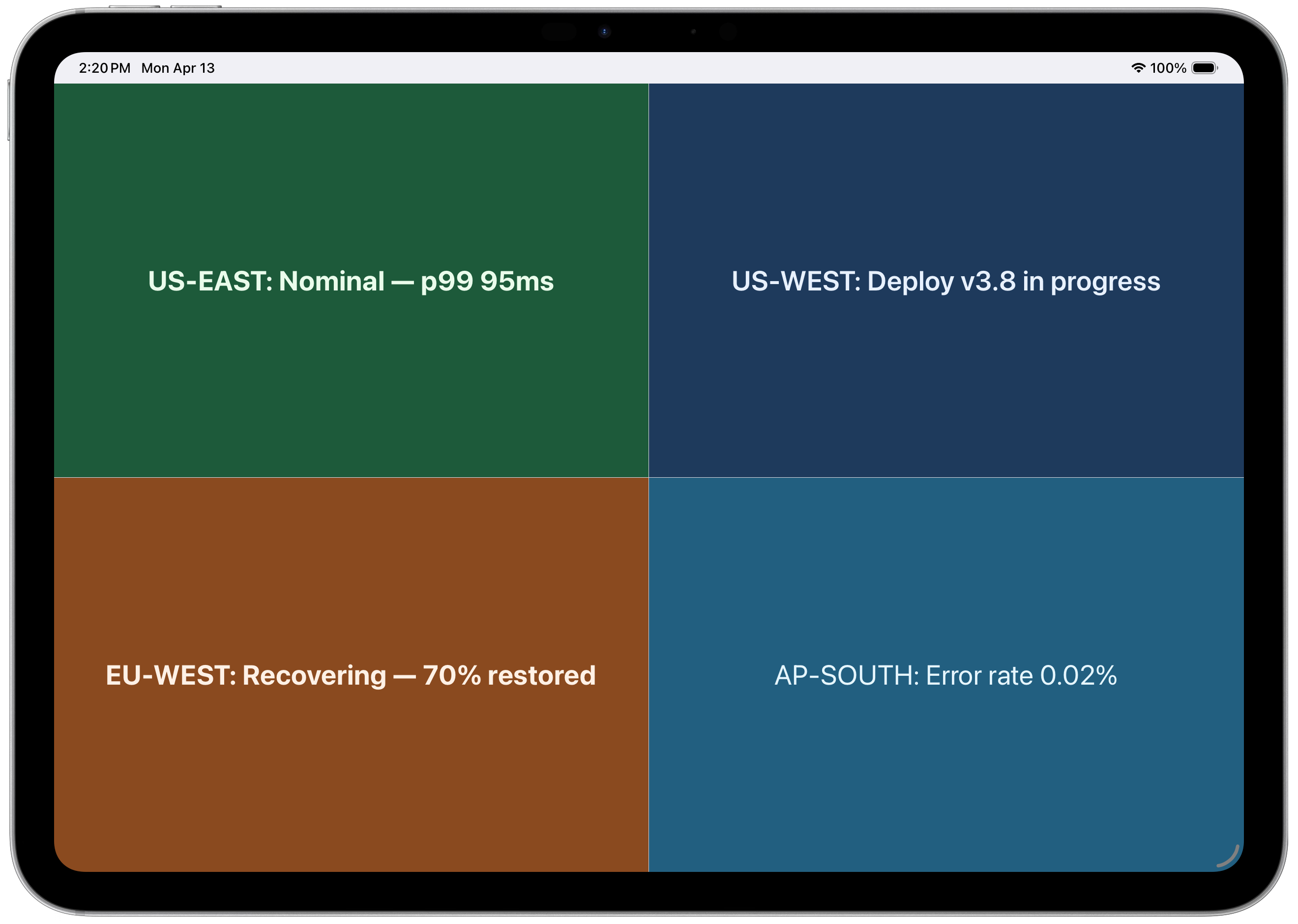
4-panel layout — regional status at a glance
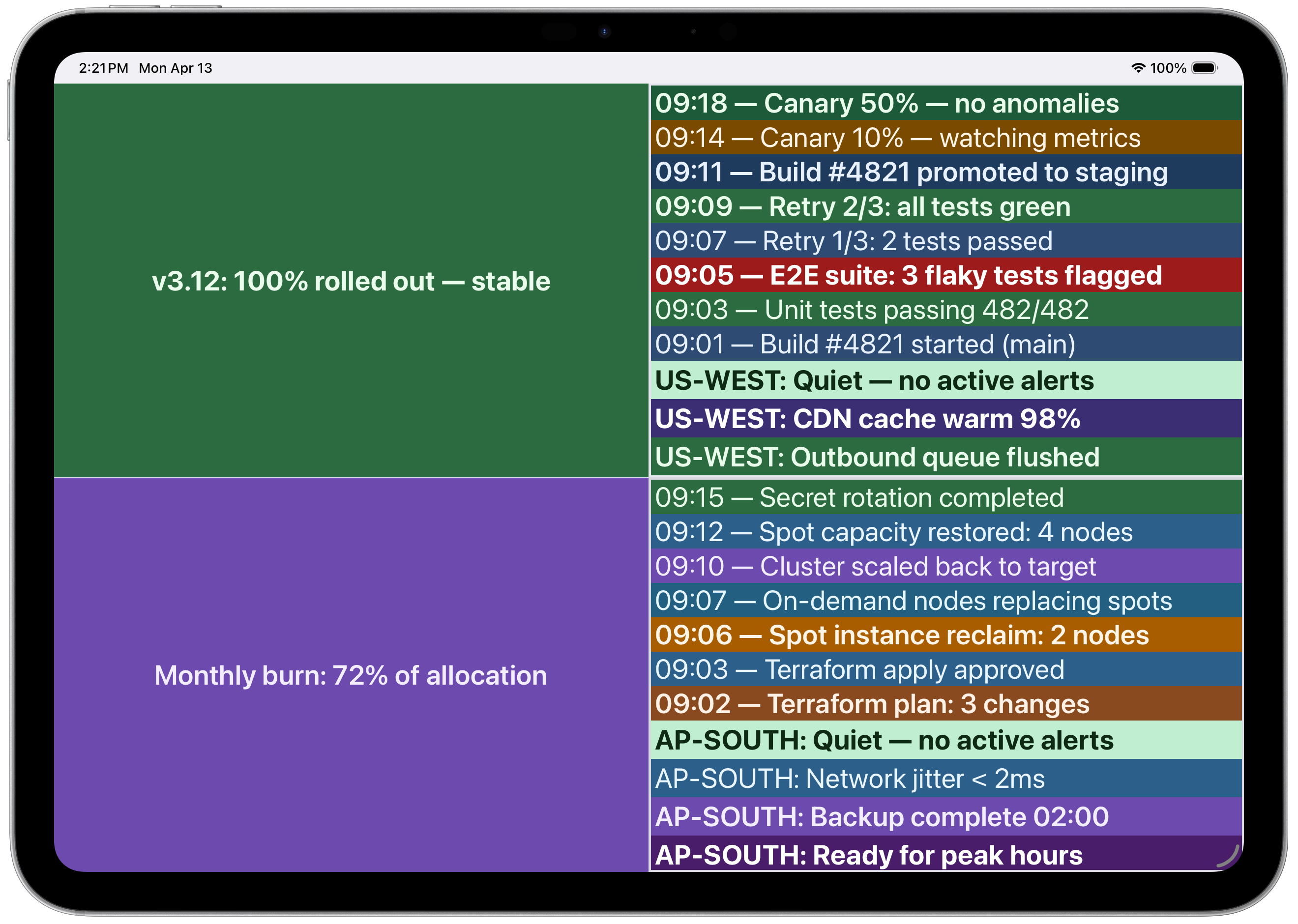 Multi-panel with CI/CD pipeline and infrastructure logs
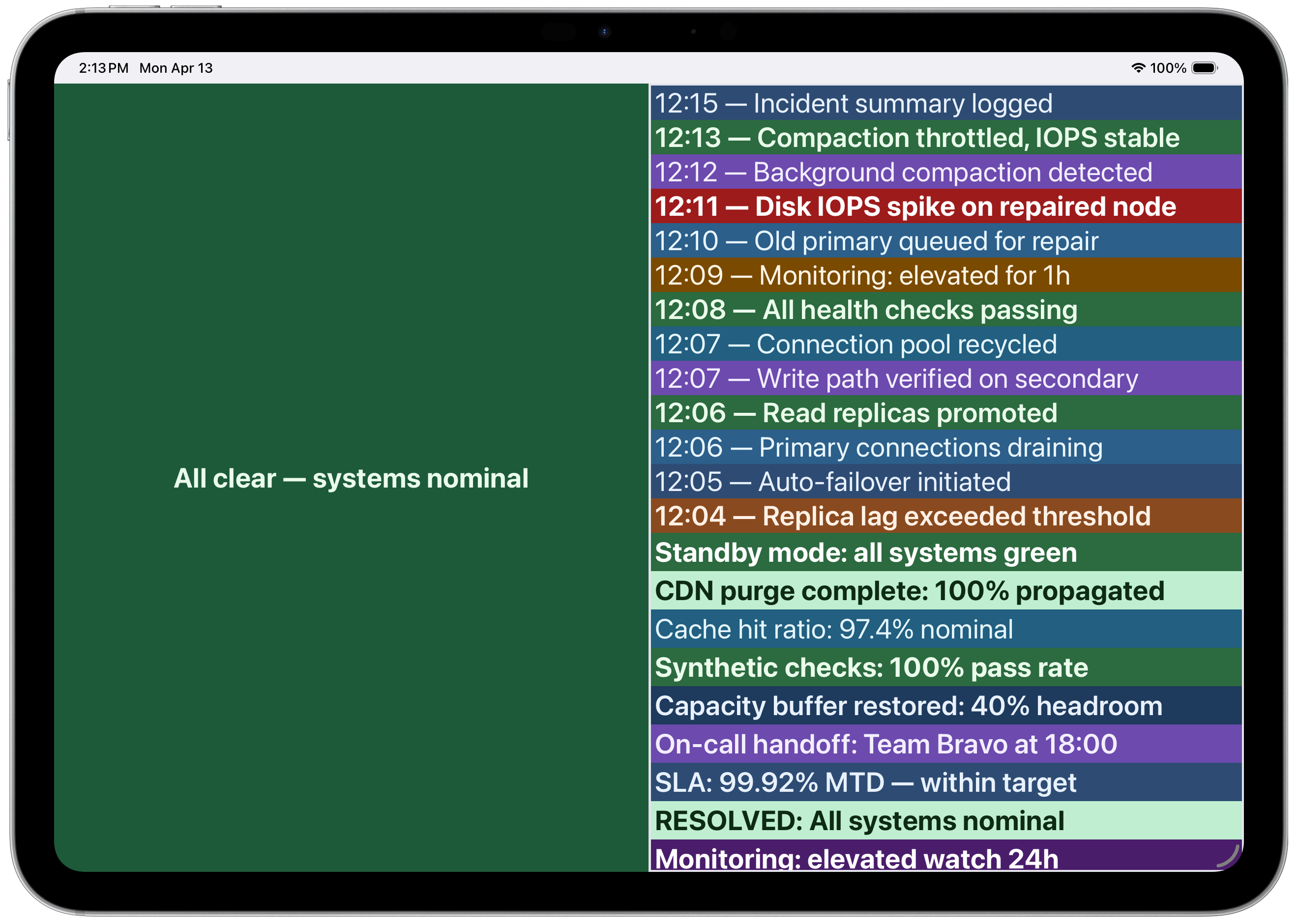 Incident timeline with color-coded severity
📄 License
MIT
%20--%3e%3cdefs%3e%3cstyle%3e%20.st0%20{%20fill:%20%23061b40;%20}%20.st1%20{%20fill:%20%23306af1;%20}%20.st2%20{%20fill:%20%235ce5cf;%20}%20%3c/style%3e%3c/defs%3e%3cg%3e%3cpath%20class='st0'%20d='M55,10.5h9v3h-9v9h12V7.5h-12v3ZM64,19.5h-6v-3h6v3Z'/%3e%3cpolygon%20class='st0'%20points='69%2016.5%2078%2016.5%2078%2019.5%2069%2019.5%2069%2022.5%2081%2022.5%2081%2013.5%2072%2013.5%2072%2010.5%2081%2010.5%2081%207.5%2069%207.5%2069%2016.5'/%3e%3cpolygon%20class='st0'%20points='95%2010.5%2095%207.5%2083%207.5%2083%2022.5%2095%2022.5%2095%2019.5%2086%2019.5%2086%2016.5%2095%2016.5%2095%2013.5%2086%2013.5%2086%2010.5%2095%2010.5'/%3e%3cpath%20class='st0'%20d='M40,1.5v21h11.6l1.4-1.4v-7.6h0c0,0-1.4-1.5-1.4-1.5l1.4-1.4V2.9l-1.4-1.4h-11.6ZM50,19.5h-7v-6h7v6ZM50,10.5h-7v-6h7v6Z'/%3e%3c/g%3e%3cpath%20class='st1'%20d='M23.1,24L14.7,4.8l-4.9,11.2h3.8l-1.8,4H3.3L12.1,0H2C.9,0,0,.9,0,2v20c0,1.1.9,2,2,2h21.1Z'/%3e%3cpath%20class='st2'%20d='M34,0h-16.8l10.6,24h6.2c1.1,0,2-.9,2-2V2C36,.9,35.1,0,34,0ZM32.5,20h-4V4h4v16Z'/%3e%3c/svg%3e)
 Join Now


