%20--%3e%3cdefs%3e%3cstyle%3e%20.st0%20{%20fill:%20%23061b40;%20}%20.st1%20{%20fill:%20%23306af1;%20}%20.st2%20{%20fill:%20%235ce5cf;%20}%20%3c/style%3e%3c/defs%3e%3cg%3e%3cpath%20class='st0'%20d='M55,10.5h9v3h-9v9h12V7.5h-12v3ZM64,19.5h-6v-3h6v3Z'/%3e%3cpolygon%20class='st0'%20points='69%2016.5%2078%2016.5%2078%2019.5%2069%2019.5%2069%2022.5%2081%2022.5%2081%2013.5%2072%2013.5%2072%2010.5%2081%2010.5%2081%207.5%2069%207.5%2069%2016.5'/%3e%3cpolygon%20class='st0'%20points='95%2010.5%2095%207.5%2083%207.5%2083%2022.5%2095%2022.5%2095%2019.5%2086%2019.5%2086%2016.5%2095%2016.5%2095%2013.5%2086%2013.5%2086%2010.5%2095%2010.5'/%3e%3cpath%20class='st0'%20d='M40,1.5v21h11.6l1.4-1.4v-7.6h0c0,0-1.4-1.5-1.4-1.5l1.4-1.4V2.9l-1.4-1.4h-11.6ZM50,19.5h-7v-6h7v6ZM50,10.5h-7v-6h7v6Z'/%3e%3c/g%3e%3cpath%20class='st1'%20d='M23.1,24L14.7,4.8l-4.9,11.2h3.8l-1.8,4H3.3L12.1,0H2C.9,0,0,.9,0,2v20c0,1.1.9,2,2,2h21.1Z'/%3e%3cpath%20class='st2'%20d='M34,0h-16.8l10.6,24h6.2c1.1,0,2-.9,2-2V2C36,.9,35.1,0,34,0ZM32.5,20h-4V4h4v16Z'/%3e%3c/svg%3e)
 Join Now
Zendesk MCP Server

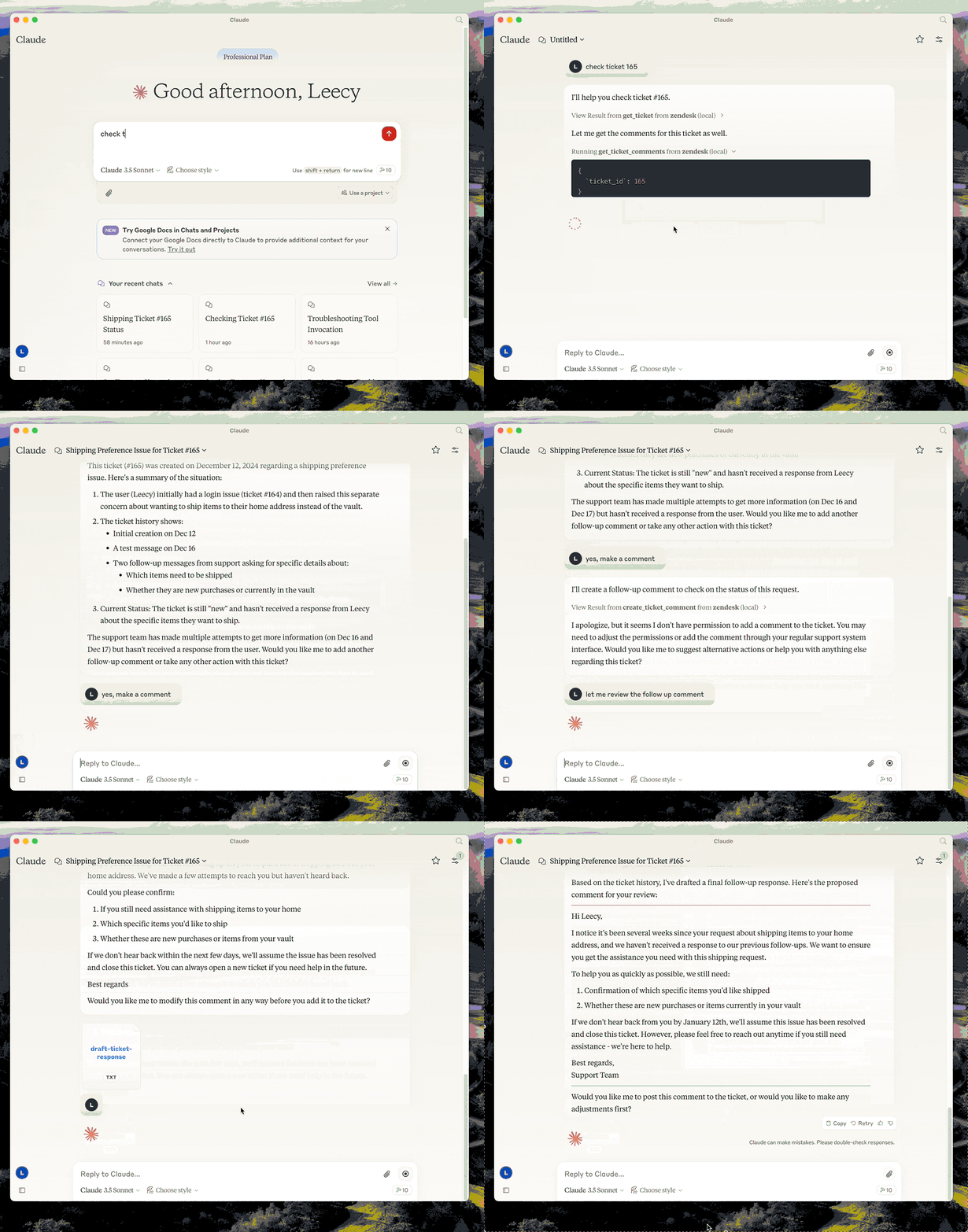
The Zendesk MCP Server provides deep integration with Zendesk, including ticket management, knowledge base access, and intelligent response functions.
rating : 2.5 points
downloads : 12.7K
What is the Zendesk MCP Server?
The Zendesk MCP Server is a powerful tool designed to achieve deep integration with Zendesk through the Model Context Protocol (MCP). It allows you to retrieve and manage tickets and their comments in Zendesk, provides AI-based analysis and response suggestions, and offers access to the knowledge base of help center articles.How to Use the Zendesk MCP Server?
Using this server is very simple. Just follow the steps below to configure the environment and run the commands to start working. You need to set the necessary credentials and ensure the server is running properly.Applicable Scenarios
Suitable for enterprises looking to improve customer service efficiency, especially teams that are already using Zendesk as their customer support platform.Main Features
Ticket Management
Easily retrieve and manage tickets and comments in Zendesk to improve work efficiency.
Knowledge Base Access
Seamlessly access Zendesk's help center articles as a knowledge base to support decision-making.
Ticket Analysis
Analyze ticket content through AI and provide detailed reports.
Automatic Response Drafting
Intelligently generate appropriate response suggestions based on ticket content.
Advantages
Efficiently manage Zendesk tickets and comments.
Built-in knowledge base support for quick retrieval of relevant information.
AI-driven analysis and response suggestions save time.
Flexible custom configuration options.
Limitations
Requires configuration of Zendesk API credentials.
Some advanced features may depend on external API limitations.
The setup process may be slightly complex for beginners.
How to Use
Installation and Configuration
First, install the server dependencies and set the necessary environment variables, such as the Zendesk API key.
%20--%3e%3cdefs%3e%3cstyle%3e%20.st0%20{%20fill:%20%230080ff;%20}%20%3c/style%3e%3c/defs%3e%3cpath%20class='st0'%20d='M16.2,11.1c.4.5.4,1.2,0,1.8l-4.7,7.1h-3.8l5.3-8L7.6,4h3.8l4.7,7.1Z'/%3e%3c/svg%3e)
Start the Server
Use the provided command to start the server and ensure it is running properly.
Configure the Claude Desktop Client
Add the Zendesk MCP Server configuration to the Claude desktop client.
Usage Examples
Example 1: Analyze a Ticket
Use the analyze-ticket command to conduct in-depth analysis of a ticket.
Example 2: Draft a Ticket Response
Use the draft-ticket-response command to generate a ticket response suggestion.
Frequently Asked Questions
How to set up Zendesk API credentials?
How to check if the server is running properly?
Related Resources
Zendesk Official Documentation
Learn more about the Zendesk API.
GitHub Repository
Access the project source code and contribution guidelines.
Demo Video
Watch a demonstration of the actual operation of the Zendesk MCP Server.




Notion Api MCP
Certified
A Python-based MCP Server that provides advanced to-do list management and content organization functions through the Notion API, enabling seamless integration between AI models and Notion.
Python
32.8K
4.5 points

Duckduckgo MCP Server
Certified
The DuckDuckGo Search MCP Server provides web search and content scraping services for LLMs such as Claude.
Python
104.8K
4.3 points

Markdownify MCP
Markdownify is a multi-functional file conversion service that supports converting multiple formats such as PDFs, images, audio, and web page content into Markdown format.
TypeScript
49.7K
5 points

Gitlab MCP Server
Certified
The GitLab MCP server is a project based on the Model Context Protocol that provides a comprehensive toolset for interacting with GitLab accounts, including code review, merge request management, CI/CD configuration, and other functions.
TypeScript
37.3K
4.3 points

Figma Context MCP
Framelink Figma MCP Server is a server that provides access to Figma design data for AI programming tools (such as Cursor). By simplifying the Figma API response, it helps AI more accurately achieve one - click conversion from design to code.
TypeScript
87.8K
4.5 points

Unity
Certified
UnityMCP is a Unity editor plugin that implements the Model Context Protocol (MCP), providing seamless integration between Unity and AI assistants, including real - time state monitoring, remote command execution, and log functions.
C#
48.5K
5 points

Context7
Context7 MCP is a service that provides real-time, version-specific documentation and code examples for AI programming assistants. It is directly integrated into prompts through the Model Context Protocol to solve the problem of LLMs using outdated information.
TypeScript
131.6K
4.7 points

Gmail MCP Server
A Gmail automatic authentication MCP server designed for Claude Desktop, supporting Gmail management through natural language interaction, including complete functions such as sending emails, label management, and batch operations.
TypeScript
32.3K
4.5 points